Updated: July 28, 2026
|
14 min read
Updated: July 28, 2026
|
14 min read
Campaign Optimization for Pop Ads: Post-Launch Fixes That Actually Work

The campaign launched clean. Spend came in. Clicks looked normal. Conversions stayed at zero long enough for that bad feeling to kick in.
Campaign optimization for pop ads is mostly about not panicking in the first 72 hours. The order matters more than the tactic, because one bad postback or one greedy zone can make a decent funnel look dead. If you haven’t launched yet, start with the campaign setup playbook – I bet we covered half of the fixes there.
How do you optimize a pop ad campaign after launch?
Campaign optimization pop ads works best in a fixed sequence: verify tracking, read a minimum scoreboard, cut waste at zone level, adjust bids, tighten targeting only where the data is clear, tune frequency caps and dayparting, then test the landing path. Example: if CPA is too high, cutting zones at 3x target CPA with zero conversions usually fixes more than touching bids first.
Step 1: Validate tracking, postback, and attribution before changing anything
A 5%+ click gap between your tracker and traffic source is not “normal variance.” It is a broken setup until proven otherwise, and any optimization after that is guesswork.
Check four things in order:
- Match tracker clicks against network clicks. If divergence is above 5%, fix the postback first.
- Confirm the conversion fires end to end in your tracker, like Voluum, Binom, RedTrack, or Keitaro.
- Test the lander load speed on target devices. Over 3 seconds is the problem, not the traffic.
- Verify attribution windows and tokens are passing correctly.
I’ve blacklisted half a campaign before realizing the postback was the real loser. Expensive lesson.
The data can look clean and still be lying to you. The harder part starts once tracking is actually telling the truth.
Step 2: Read the minimum optimization scoreboard
Most buyers stare at CPA first. Fair. But CPA without zone spread, visit quality, and EPV is how you keep bad inventory alive for too long.
My minimum scoreboard for a live funnel is:
- CPA against target
- ROI or profit by campaign and source
- CR from visit to conversion
- Spend by zone
- EPV or EPI versus CPM
- Visit quality signals like duration and offer-click rate
- Zone distribution
If 90% of clicks come from 2-3 zones, that traffic sample is not representative. Normally, pop traffic should spread across 20+ zones over time according to practitioner data. If visit duration is under 5 seconds or visit-to-offer-click rate is below 5%, that is usually a traffic problem, not a lander problem.
Once the scoreboard makes sense, the obvious cuts usually show themselves faster than buyers want to admit.
Step 3: Cut obvious losers at the zone and source level
If you let one bad zone eat 30% of spend because you “need more data,” the campaign usually pays for your patience with red numbers.
Use hard rules. For most campaigns, blacklist a zone at 3x target CPA in spend with zero conversions. For Tier-1 iGaming with $50+ CPA targets, extend that to 5x because variance is wider (industry benchmark). For Tier-3 giveaway offers with $2-4 CPA targets, 2x is often enough because margins are thin.
A second cut rule works well when conversions exist but quality is weak: if a zone’s EPV is below 50% of campaign average, it is dragging the funnel. Kill it or isolate it. And never blacklist on one day of data unless the overspend is ugly (this is the part everyone skips).
Blacklist is easy. Keeping yourself from over-cutting before the pattern is clear is where buyers usually lose tomorrow’s winners.
Step 4: Adjust bids only after quality pruning
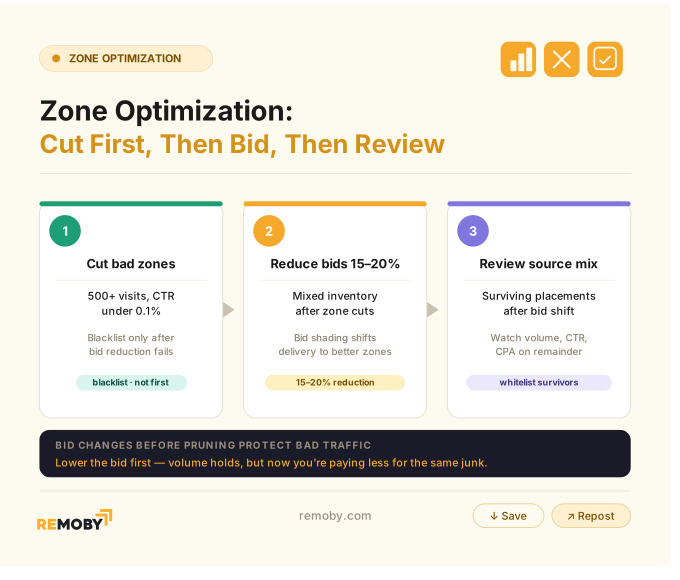
Bid changes before pruning usually protect bad traffic. You lower the bid, volume holds, and now you’re paying slightly less for the same junk.
After zone cuts, reduce bids 15-20% on mixed inventory and watch what happens to the source mix. In pop, bid shading often shifts delivery into better zones automatically. If a zone has 500+ visits and CTR under 0.1%, lower the bid first; blacklist only if nothing improves after the next window.
Bids feel like the faster lever. Usually they’re the messier one.
Step 5: Refine targeting by segment evidence, not guesswork
Most people tighten GEO, OS, or browser too early. Reality is uglier: broad targeting often isn’t the problem, one rotten segment inside it is.
Cut device, OS, browser, or carrier only when a subset is clearly dragging averages over enough spend. If Android Chrome in Brazil is running 2.2x target CPA while Samsung Internet and desktop are near goal, isolate that segment. If everything is evenly bad, targeting is not your first lever.
This is where networks like PropellerAds, Adsterra, and Remoby (one network worth testing for Tier-2 pop) become useful for clean segment reads, because zone, browser, and device splits are visible enough to act on.
When every segment looks mediocre, the problem is usually upstream or downstream — not in the targeting menu.
Step 6: Tune frequency caps and dayparting
Start new pop campaigns at 1 impression per user per 24 hours. Anything looser before you know the zone quality is how fatigue sneaks in.
Tighten frequency to 1 per 48 hours when CTR decays day over day across the same zones with flat impression volume. If CTR drops evenly across all zones, that points to fatigue. If CTR collapses only in a few zones while the rest hold, that is a zone quality issue instead. We covered cap-picking logic by GEO, payout, and funnel in pop ads frequency capping blog.
Dayparting needs patience. Run all hours open for 5-7 days first, then pull hour-of-day data. After 500+ conversions, flag blocks that sit above 2x target CPA across multiple days. If a block is 3x+ CPA with low volume, cut it. If the block has useful volume but elevated CPA, reduce bids 20-30% there instead of killing it. (yes, I’ve done this too)
Hours are easy to cut. The trick is not cutting the ones that were about to stabilize.
Step 7: Test page and offer fixes, then scale only stable winners
Sending pop traffic straight to a cold offer page is still one of the fastest ways to burn a decent whitelist. The traffic gets blamed first because the page is harder to admit was weak.
Use this sequence when you suspect the landing path:
1. If 2,000 visits produce 0 offer clicks, the pre-lander is failing.
2. If 2,000 visits produce 400 offer clicks and 0 conversions, check postback or offer page quality.
3. Run a control test with 200-300 clicks from a known good zone. If CVR recovers, the issue is traffic. If not, fix the lander or offer.
Scale only after 40+ conversions, CPA within ±15% of target for 7 straight days, and no single zone driving more than 35% of conversions. Raise budget 30-50%, then wait 3 days. Never raise budget and open new zones at the same time. That is how you bury the signal under fresh noise.
A campaign can be profitable and still be fragile. You only find out after the first scale attempt.
Ready to launch with Remoby?
Which metrics matter most for campaign optimization in pop ads?
Campaign optimization pop ads depends on a short scoreboard: CPA, ROI, conversion rate, spend by zone, EPV or EPI versus CPM, visit quality, and zone distribution. Explanation matters because no single metric tells you what to change. Example: a high CPA with strong visit quality points to the lander or offer, while a high CPA with weak duration and concentrated zone spend points to traffic quality.
Tracking validation and attribution checks before optimization
If the tracker says 9,500 clicks and the traffic source says 10,300, stop there. A broken postback creates fake losers and fake winners.
For live diagnostics, compare clicks, then compare conversions, then confirm the same timezone across tracker, network, and affiliate platform like Affise or ClickDealer. One mismatch is enough to make dayparting and zone pruning look smarter than they are.
The minimum scoreboard: CPA, ROI, conversion rate, spend, EPV/EPI, visit quality, and zone distribution
Verdict first: if you can only watch three things, watch CPA, zone spend concentration, and visit-to-offer-click rate.
But the full operating view is better:
| Metric | What it tells you | First action |
|---|---|---|
| CPA | Whether the acquisition funnel is economically viable | Eliminate obvious waste before testing new pages or creatives |
| ROI | Whether profitability survives beyond acquisition cost | Hold spend, reduce bids, or reassess scaling pace |
| CR | Where conversion friction exists inside the funnel | Compare landing page performance versus offer performance |
| EPV/EPI vs CPM | Whether traffic source economics are sustainable | Adjust bids, prune weak zones, or reallocate budget |
| Visit quality | Whether users are genuine, engaged, and relevant | Review source mix, placements, and zone quality |
| Zone distribution | Whether delivery is diversified or overly concentrated | Reduce concentration risk through blacklisting or bid controls |
| Verdict | Metrics gain meaning when analyzed together | Single-metric optimization often creates false winners and wasted spend |
Pop campaign targeting settings that matter
Out of everything in Remoby’s targeting panel, four settings matter once a campaign is live:
- Audience intent level
- Countries
- Operation systems
- Browsers
Audience intent level splits traffic into High-intent, Considering, and Exploring – hot, average, and cheap, basically. Leave all three on at launch, then check which one is dragging your CPA down. Countries and Operation systems go together – an old OS in one specific country is usually where the garbage traffic hides, so cut narrow there instead of blocking a whole region.
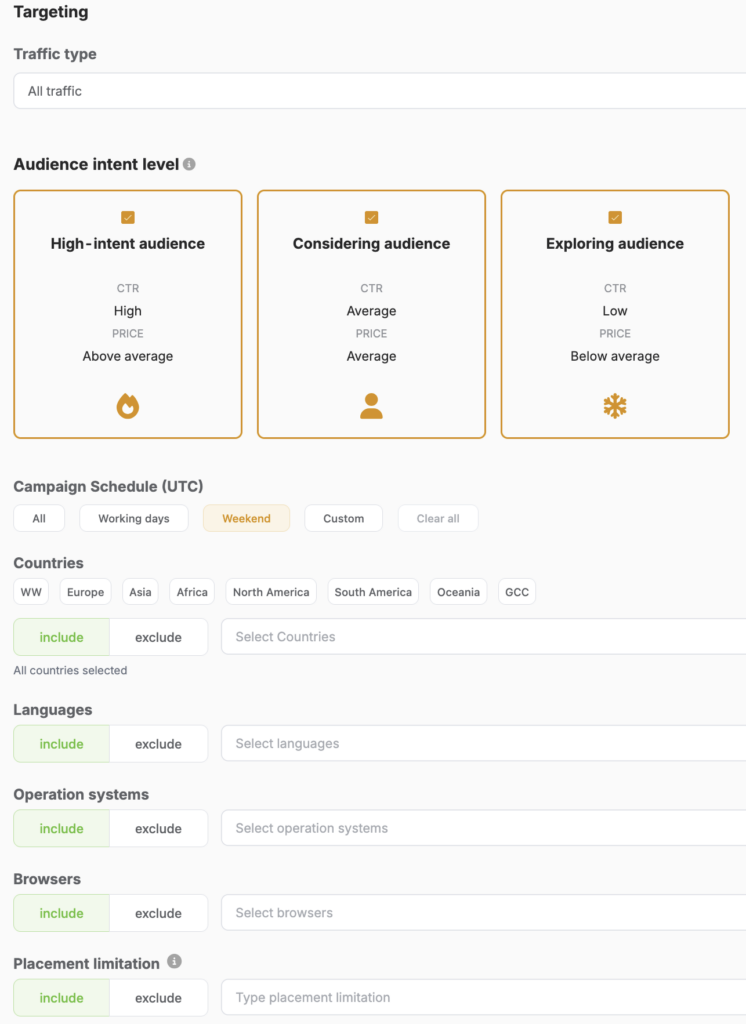
Browsers come next, but only after you’ve got real data, not on day one. Only cut a browser if it’s clearly worse than the rest at similar volume — don’t touch it just on a hunch.
Just don’t change it the same day you touch Countries or OS, or you won’t know which one actually helped. Placement limitation and Campaign Schedule are the last things to fiddle with, once the main targeting has settled down.
Symptom-to-action diagnostic table for live pop campaigns
Most live pop failures look random until you map symptom to first check. After that, the path gets a lot less dramatic. Read this table to see how to diagnose a poor performance campaign.
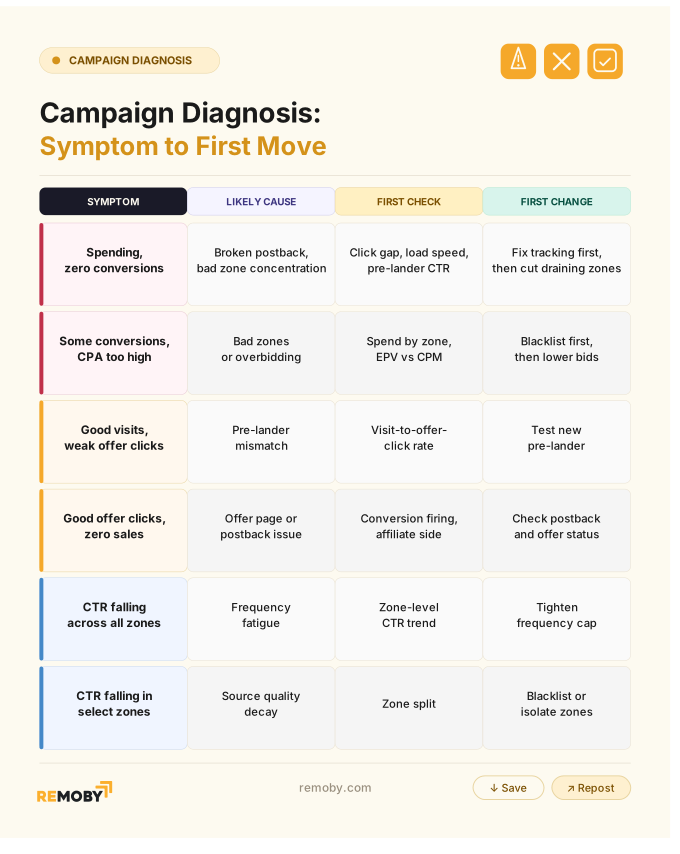
The table gets you to the first move. The expensive mistake is changing two more things before that first move has time to prove anything.
What to test when a pop campaign spends but not converts?
Spending but not converting should be tested in this order:
tracking integrity, landing page load speed, pre-lander click-through, and zone distribution.
Explanation matters because bid or creative changes before these checks usually hide the real cause. Example: 2,000 visits with strong offer clicks but zero conversions often means postback or offer-page failure, not weak traffic.
Check data integrity, then confirm enough spend and clicks for a real signal
If you have 80 clicks and no conversions, you do not have a diagnosis yet. If you have 2,000 visits, enough spend, and zero downstream action, now you do.
Use a 48-72 hour window before making conclusions on active tests, then make one change at a time with another 48-hour read window.
Review visit quality and source concentration before touching the page
Failure usually starts with traffic mix, not with your favorite pre-lander theory. If top 3 zones drive 70%+ of visits, that concentration alone can wreck the read.
Visit duration under 5 seconds and offer-click rate under 5% point at traffic quality. Healthy engagement with no conversions points lower in the funnel.
Decide whether to cut zones, lower bids, or test the landing path
If one or two zones are draining spend, cut them first. If the surviving zones are mixed but expensive, lower bids 15-20%. If visit quality is fine across zones and devices, test the lander or pre-lander next.
That sequence feels slow when a campaign is bleeding. It is still faster than fixing the wrong problem.
How can I diagnose the performance?
Bad pop campaign performance is diagnosed by where the drop happens and whether weakness clusters by segment. Explanation is straightforward: targeting problems show up in specific GEO or device slices, bid problems show up as overpriced or low-value inventory, and landing-page problems show up after the click with weak offer progress. Example: strong visit quality across zones with low offer clicks usually points to the pre-lander, not the bid.
Signs the problem is traffic quality or source mix
If you see short visits, low offer-click rate, and heavy concentration in a few zones, call it what it is: source mix trouble.
The quickest confirmation test is sending 200-300 clicks from a known good verified zone. If CVR recovers, the traffic was the problem.
Signs the problem is bids or overbidding low-value placements
Most buyers assume more bid equals better users. In pop, more bid often means faster access to inventory that does not fit your funnel.
If conversion volume exists but the source mix looks soft and CPM keeps climbing, trim bids before touching the page. I’ve seen a 15% bid cut improve CPA because it pushed volume away from overpriced placements. (spoiler: it didn’t scale the way I expected)
Signs the problem is landing page, pre-lander, or offer fit
If traffic quality is healthy and the offer click dies on the page, stop blaming the zone.
A pre-lander with 2,000 visits and zero offer clicks is failing. A flow with strong offer clicks and zero conversions is usually an offer-side or tracking problem.
Zone and placement optimization: blacklist, whitelist, and source pruning
Three bad zones can wreck a full run-of-network test. That is why source pruning stays at the center of pop buying.
When to blacklist immediately versus gather more data
If a zone hits 3x target CPA with zero conversions, blacklist it. If you are running high-payout iGaming, stretch that to 5x. If margins are thin in Tier-3 giveaway, 2x is enough. I’d recommend waiting at least 3 days per zone before blacklisting unless overspend is severe. For the full stage-based approach – pruning, thresholds, and the whitelist transition – see blacklist management.
How to build a whitelist from repeatable winners
Winners are not the zones with one lucky conversion. Winners are the zones that keep CPA in line after a bid cut, across a few days, without hogging all delivery.
Whitelist the stable ones, then test them separately with controlled bid increases. Zone-level thresholds and the four-state decision matrix are in the popunder zone optimization framework.
Should I lower bids or cut bad zones first when CPA is too high?
Bad zones usually get cut before bids are lowered because pruning removes waste without weakening the parts of the campaign that still work. Explanation is practical: bid cuts affect the whole auction path, while zone cuts are more surgical. Example: a zone spending 3x target CPA with zero conversions should be removed before any campaign-wide bid change.
Why zone cuts usually come before bid changes
If you lower bids first, bad zones often stay in the mix and keep wasting budget at a slower pace. That looks like progress on the dashboard and feels terrible in the ledger.
When bid reductions are the better move
If surviving zones are converting but CPA is still inflated, trim bids 15-20% before you touch frequency or the pre-lander.
Bid optimization by zone and placement without collapsing volume
Lower bids in steps, not cliffs. Watch whether CPM drops while conversion share stays spread across the whitelist.
Targeting refinement by GEO, device, OS, browser, and carrier
Broad targeting is not lazy at launch. Premature narrowing is. So, my advice is:
Refine only after segment-level underperformance is clear.
Cut segments only when a device, OS, browser, or carrier is obviously pulling down the average over real spend. If the campaign is bad everywhere, targeting is not the fix.
What is the best order to change campaign variables?
Change order in a live pop campaign should be tracking, zone cuts, bid changes, targeting refinement, frequency and dayparting, then landing-page tests. Explanation is simple: earlier steps remove bad data and bad traffic, while later steps test conversion lift. Example: changing a pre-lander before fixing a 5%+ click mismatch only creates cleaner-looking confusion.
Use that order every time unless the page is visibly broken. One variable at a time. Two if you enjoy fiction in your data.
When to scale a profitable pop ad campaign after optimization
Scale only when the campaign is boring. Stable winners rarely look exciting in the dashboard.
Use three checks: 40+ conversions, CPA within ±15% of target for 7 straight days, and no zone over 35% of conversions. Raise budget 30-50%, then watch whether top-zone CPM jumps 20%+. If it does, stop vertical scaling and duplicate into a new GEO or source. That call – budget bump vs new GEO – is the core of horizontal vs vertical scaling.
The buyer who wanted to “fix it with bids” was wrong. Two zones were eating the budget, the pre-lander needed work, and the campaign only became scalable once both problems were handled in order.
Ready to launch with Remoby?
FAQ for pop ad optimization campaign
Top 5 questions from our users
Frequency caps and dayparting should be adjusted after enough stable data exists to separate fatigue from source quality, usually every 48 hours for active changes and after 5-7 days for full hour-of-day review. Explanation matters because overreacting to one day of noise ruins delivery. Example: tighten frequency when CTR decays across all zones, but only cut hours after repeated 2x-3x CPA patterns. If CTR decay is uniform, tighten frequency first. Start at 1/24h, move to 1/48h when repeat exposure stops helping, and only loosen on proven whitelist zones with stable CPA.
A tracker is not optional if you want reliable zone, device, and postback reads. Google Analytics will not give you the source-level control you need for blacklisting, whitelisting, or attribution checks.
The same sequence works across Remoby, Clickadu, PropellerAds, Adsterra, and similar sources because the logic stays the same: validate data, prune waste, rebid, refine targeting, then test the funnel. Thresholds change by GEO, payout, and vertical.
Hold a 48-hour evaluation window between changes on active campaigns. Touch one variable at once, then read the result before moving again.
Kill hours last. If a time block has meaningful volume but worse CPA, lower bids first. Hard cuts are for repeated 3x CPA windows with no recovery.
![Pop Ads CPM in Mexico [2026]](https://remoby.com/wp-content/uploads/2026/07/Screenshot-2026-07-30-at-16.06.45-768x432.png)