Updated: July 28, 2026
|
12 min read
Updated: July 28, 2026
|
12 min read
How to Set Up a Postback URL for Pop Campaigns

The setup that looks finished in the tracker UI is usually where the real failure starts. How to set up postback url for pop campaigns is not hard in theory. The hard part is proving the clickid survives every hop, because one blank token can leave you buying clean-looking volume with broken attribution. So, if you’re choosing you affiliate tracking software now, this post is worth a 9 min read.
What a postback URL is and how S2S tracking works for pop campaigns
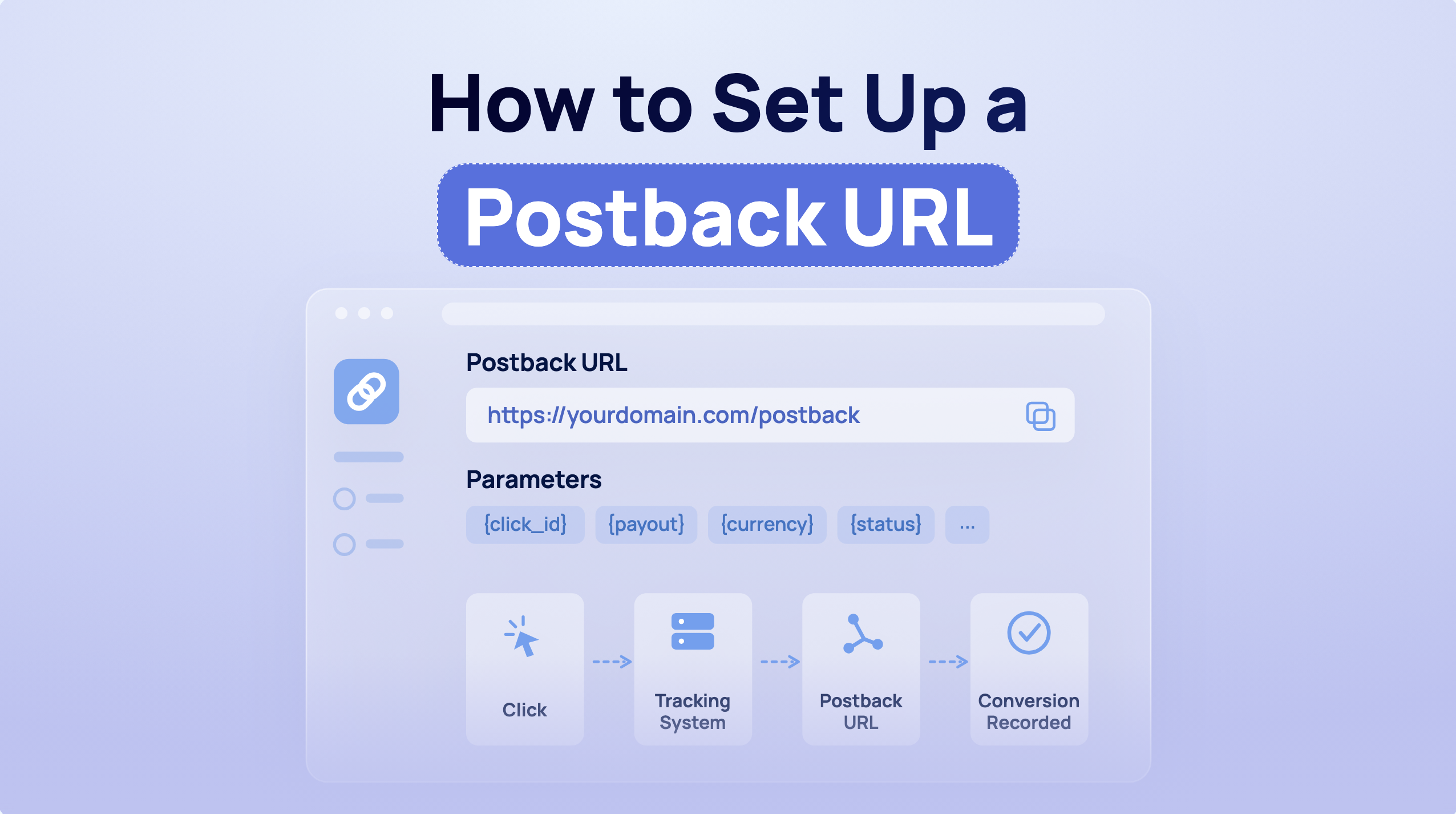
A postback URL is a server-to-server (S2S) callback sent by an affiliate network when a conversion happens, carrying the data needed to match that conversion back to the originating click. For pop campaigns specifically, the cookieless nature of S2S tracking is not a feature. It is the only thing that keeps zone-level reports usable.
Instead of relying on the user’s browser, this mechanism communicates directly between servers, delivering instant and dependable information about key user actions such as purchases, sign-ups, or app installations.
If you send pop traffic from Remoby, the click moves through more redirects than most buyers account for in planning. Prelander, tracker, offer, and sometimes another redirect on the network side. Pixel tracking has more places to disappear in that chain. Server-side callbacks reduce that fragility, which is why S2S postback is the standard tracking method for push and pop at any real volume.
The practical point is simpler than the docs make it sound:
- Your tracker creates a unique ClickID.
- That clickid gets passed to the affiliate network inside the offer URL.
- When the lead, sale, or FTD happens, the network fires the postback back to the tracker with the same ClickID plus payout and optional fields.
- The callback exists.
The deeper mechanics – event flow and matchback failure modes – are in how server-side tracking works blog.
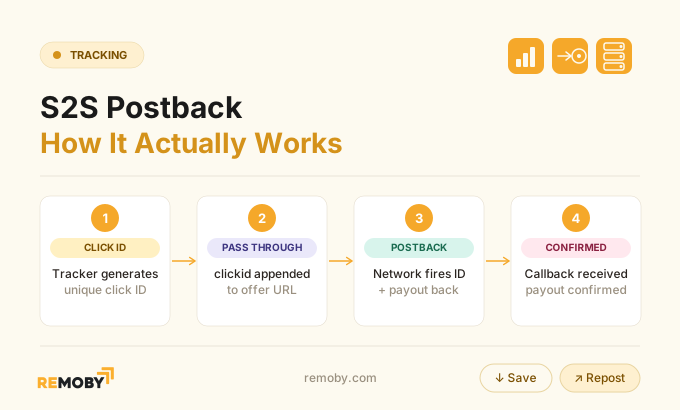
The harder part is the handoff chain, because a correct postback template still fails if the clickid was lost before the conversion ever happened.
How the full click ID flow works
Click ID flow is a four-step handoff:
- the traffic source sends a click with a source macro
- the tracker records the visit and generates its own click identifier
- the affiliate network receives that identifier in the offer URL
- and the network returns the same value in the conversion postback.
One good example: an ad network can pass ${SUBID} into the tracker, the tracker passes its clickid as cid to the offer, and the network sends that cid back on conversion.
That sequence is where most losses happen, not in the final callback itself.
Standard tracker documentation covers the middle and end of the chain: get the tracker postback, replace placeholders with network tokens, paste it into the affiliate network. Useful, but incomplete for pop buyers, because pop traffic adds a critical first handoff that most guides skip.
Here is the unified flow:
- Traffic source click: a user hits a pop placement. The source appends its macro, often a subid or zone macro.
- Tracker capture: the tracker logs the visit and creates its own clickid for attribution.
- Offer redirect: the tracker sends the visitor to the affiliate offer and appends that clickid in the parameter the network expects, such as
cid,clickid,s1, oraff_sub. - Return postback: the affiliate network stores that parameter and later returns it in the postback, along with payout, txid, and optional status or currency fields.
Source macro and tracker clickid are not the same thing. The source macro identifies the incoming visit. The tracker clickid is the key the network must return later. Mixing those up is how buyers end up with conversions in the network and nothing in the tracker.
What decides whether the chain holds is not the UI label on the token. It is whether every platform expects the same field name and receives it unstripped.
What parameters and macros are required
Postback parameters fall into two groups: mandatory attribution fields and operational fields. Mandatory attribution starts with a click identifier that the network stores and returns. Operational fields include payout, transaction ID, status or event name, currency, and source or account identifier. Voluum documents cid as mandatory, with payout, txid, and currency as optional but critical for margin reporting and reconciliation.
For pop traffic, the minimum viable field set is usually:
- clickid / cid: required to match the conversion to the original click
- payout / revenue: required if you want actual ROI and not flat conversion counts
- transaction_id / txid: required for deduplication when the same event can fire twice
- status or event_name: required when the network sends pending, approved, rejected, or multi-event goals
- currency: useful when payouts can arrive in different currencies
- source: required on some tracker setups so the conversion lands in the right account instead of
unknown
The failure mode here is predictable. A flat conversion count looks fine until revenue stays at zero because the slot accepts conversions but the revenue mapping never got configured. In one tracked setup, revenue recording needed both revenue acceptance enabled and a product rate rule applied. Enabling only one left conversions visible with no revenue attached. Most teams find this on day three, not day one.
The parameter naming detail matters more than the field list.
On the outbound offer URL, use the exact parameter name the affiliate network expects to read back later. If the network expects cid and you pass clickid, the postback can fire perfectly and still return blank.
Step-by-step postback URL setup sequence for pop campaigns
Postback setup follows this order: configure the traffic source macro into the tracker, confirm the tracker generates and stores its clickid, append that clickid to the affiliate offer under the parameter name the network expects, copy the tracker postback template, replace tracker placeholders with network tokens, and submit the final postback at offer or global level. Pop traffic requires validating the source-to-tracker handoff first, before touching anything in the network.
- Build the traffic source URL into the tracker. Pass the source macro for click-level data and zone data if available.
- Open one test click and inspect the tracker log. Confirm the visit exists and the tracker has created a clickid.
- Configure the offer URL in the tracker. Append the tracker clickid using the exact parameter the affiliate network expects, such as
cid={clickid}. - Get the postback template from the tracker. This is the URL the network will call after conversion.
- Replace placeholders with the network’s return tokens. Map clickid first, then payout, txid, currency, and event or status if needed.
- Paste the postback into the affiliate network. Decide whether it belongs at global or offer level.
- Fire one controlled test conversion. Verify attribution before any real traffic pour.
Save this flow for your next campaign setup:
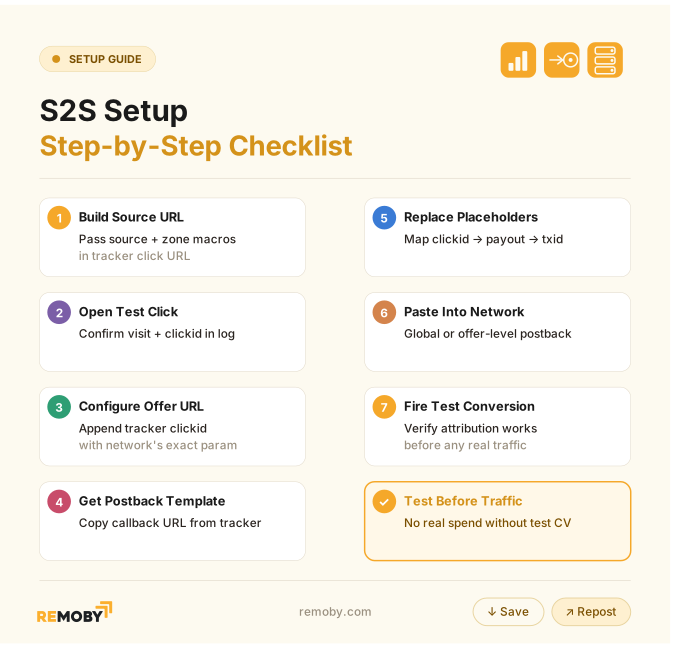
Model the sequence before the launch, not after the burn. A non-firing postback is usually an earlier pass-through problem wearing a tracker error message.
The sequence is clean on paper. The worked example is where naming collisions become obvious.
Ready to launch with Remoby?
How to set up an S2S tracking in Remoby
Server-to-server postback fires the conversion from your tracker or CPA network’s backend straight to Remoby — no cookies, no browser dependency. It works with any tracker or CPA network.
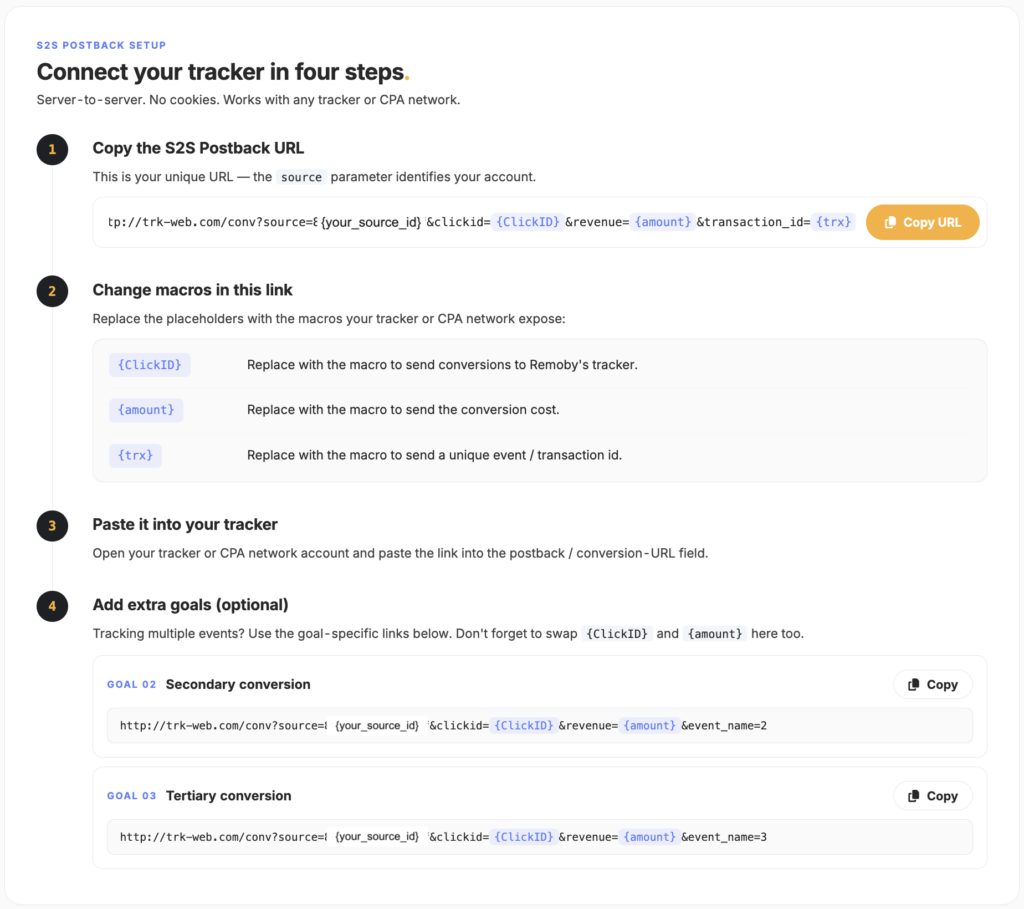
1. Copy your S2S postback URL
Grab your unique URL from the Tracking section. It looks like:
http://trk-web.com/conv?source={your_source_id}&clickid={ClickID}&revenue={amount}&transaction_id={trx}
The source parameter is set and identifies your account — don’t change it. That’s what ties every conversion back to you.
2. Replace the macros
Swap the three placeholders for the macros your tracker or CPA network exposes:
{ClickID}→ the macro that returns the click ID to Remoby’s tracker. This is the one that matters most — it’s how Remoby matches the conversion back to the original click. An empty clickid is rejected, so this must populate.{amount}→ the macro for the conversion cost/revenue.{trx}→ the macro for a unique event / transaction ID (this is what lets Remoby dedupe repeat fires).
The macro names depend on your source. Use whatever your specific tracker or network documents.
3. Paste it into your tracker
Open your tracker or CPA network account and paste the finished URL into the postback / conversion-URL field.
4. Add extra goals (optional)
Tracking more than one event? Use the goal-specific links, and remember to swap {ClickID} and {amount} in these too:
- Goal 02 — secondary conversion (e.g. FTD): same URL ending in
&event_name=2 - Goal 03 — tertiary conversion (e.g. redeposit): same URL ending in
&event_name=3
http://trk-web.com/conv?source={your_source_id}&clickid={ClickID}&revenue={amount}&event_name=2
The empty event_name on the main URL is your primary conversion; 2 and 3 map to the second and third goal slots.
Before you scale
Fire one test click, trigger a test postback from your tracker, and confirm the conversion lands in Remoby with the click ID, revenue, and transaction ID all populated — then reconcile tracker vs Remoby counts before pushing spend.
How to test whether your postback URL is recording conversions correctly before scaling
Postback testing before scale requires six checks: confirm the click reached the tracker, confirm the tracker generated a clickid, confirm the offer URL passed that clickid to the network, fire a controlled test conversion, verify payout and txid logged correctly, and reconcile tracker-to-network conversion counts within 5% before increasing spend. Manually firing a postback with a real click ID is a useful start, but not sufficient for pop traffic where partial zone failures can hide behind overall conversion volume.
- Check click capture. One manual test click must appear in the tracker.
- Check clickid storage. The tracker log must show a populated clickid.
- Check outbound pass-through. The final offer URL must visibly contain the clickid parameter expected by the network.
- Fire a test conversion. Use the network’s test tool or a controlled conversion path.
- Check revenue and txid. Payout should log, and a unique transaction ID should appear.
- Reconcile counts. Tracker and network should be within 5% before scaling ad campaign.
That last step matters more in pop than in other formats. Pop serves across many zones. If 20% of zones fail to pass the macro cleanly, you can still see enough conversions to think the setup is working until volume rises and the missing slice becomes expensive.
Passing one clean test does not clear the campaign. The remaining risk is partial failure by zone, redirect path, or event slot.
Troubleshooting why a postback URL is not firing or not recording conversions
Missing click ID in pop postback tracking usually comes from one of seven causes: wrong source macro, wrong offer-side parameter name, redirect-chain stripping, token mismatch in the network postback, status or event mismatch, duplicate suppression from missing txid, or the tracker rejecting a blank clickid. A blank clickid can trigger an HTTP 400 rejection on the tracker side, so the network reports it fired while the tracker stores nothing.
| Symptom | Likely cause | Where to check | Fix |
|---|---|---|---|
| No conversions in tracker | network never fired postback | affiliate network logs | confirm offer/global postback placement |
| Network fired, tracker shows nothing | wrong clickid token in postback | final postback URL | replace with correct network return token |
| Clicks exist, conversions unmatched | clickid never passed on offer URL | tracker redirect and network click log | fix offer parameter name to exact expected field |
| Some zones track, others do not | zone-level macro failure | segment by zone in source and tracker | pause bad zones, correct macro source-side |
| Revenue shows zero | payout mapping or revenue rule missing | tracker conversion detail | map revenue token and confirm revenue acceptance |
| Duplicate conversions | no txid mapped | conversion logs | pass unique transaction_id |
| Event reaches wrong goal | event_name mismatch | tracker goal slot config | align event_name to slot line |
A pattern worth naming from the economics side: the team keeps buying because the blended CPA still looks acceptable, while broken zones quietly dump unattributed conversions into the wrong bucket. The reporting problem becomes a bidding problem about three days later. Most teams chase the callback first and miss the earlier break.
If the postback fires and still misleads you, the next decision is whether browser-side tracking should stay in the stack at all.
When to use postback tracking instead of pixel tracking for pop campaigns
Postback tracking is the default choice for pop campaigns when attribution accuracy matters, because the conversion is sent server to server and does not depend on the browser loading a pixel.
Pixel tracking remains useful as a fallback or quick validation layer, but not as the primary source of truth for pop arbitrage at scale. S2S avoids cookie and browser restrictions that affect client-side methods, particularly on Safari and Firefox where ITP and tracker blocking are standard.
The trade-off is operational, not philosophical.
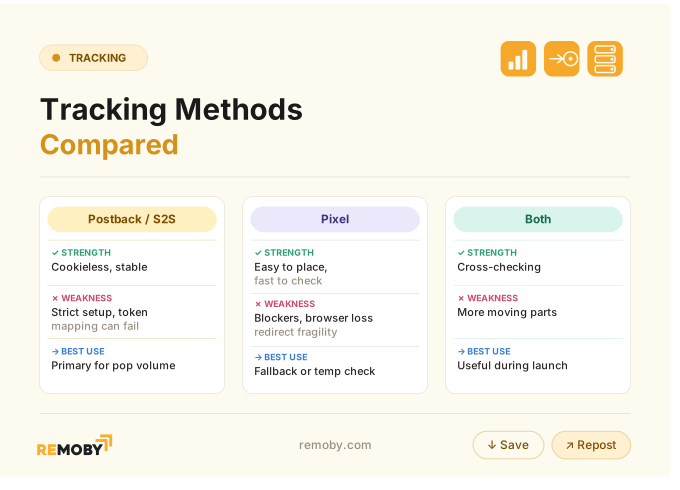
Use postback as source of truth. Keep pixel fallback only if the offer stack allows it.
The condition that flips the answer is access. If the affiliate network will not support S2S or refuses usable clickid return fields, pixel fallback becomes a necessity, not a preference.
The method choice is settled. What still decides whether your reports are real is the pop-specific attribution risk you check before launch.
Pop-specific attribution considerations and launch checks
The less obvious version of this problem is partial tracking. Pop traffic hides it well because volume keeps arriving from thousands of placements while only a subset of zones fail to pass the macro cleanly.
Three checks matter before launch:
- Segment by zone early. If a source macro fails only on part of the whitelist, the campaign can still show conversions overall while some placements never return a clickid.
- Reduce redirect hops where possible. Every extra prelander or proxy step is another chance to drop the token.
- Align goal slots and event names before multi-event offers go live. If
event_name=2is the FTD trigger, the tracker slot must match exactly or the event lands with no usable revenue flags.
I do not rush scale on pop tracking for one reason: broken subsets are expensive precisely because they do not look fully broken. They look noisy. That is worse.
Which attribution model to trust for those decisions – read in the last-click attribution in pop traffic blog.
The campaign is ready only when the FAQ answers below feel obvious from your own logs, not from the guide you are reading now.
Ready to launch with Remoby?
FAQ for S2S postback tracking
Got a question? Register and ask your manager.
Postback URL is a server-to-server callback that an affiliate network sends to a tracker after a conversion, carrying the clickid and optional fields like payout or txid. In pop campaigns, the tracker first appends its clickid to the offer URL, the network stores it, and the postback returns that same value so the conversion matches the original visit.
Postback setup starts by passing the traffic source macro into the tracker, then confirming the tracker creates a clickid, then appending that clickid to the offer URL under the parameter the affiliate network expects. Copy the tracker postback template, replace placeholders with the network's clickid, payout, and txid tokens, paste into the network, and run a test conversion before any spend.
Postback failure usually comes from missing clickid pass-through, wrong token replacement, redirects stripping parameters, status or event mismatches, or missing txid for deduplication. In pop campaigns, partial zone-level macro failure is an additional common problem. The fix starts upstream: verify the click reached the tracker, the offer URL carried the clickid, and the network returned the same field in the callback. The setup stops being fragile when the clickid survives all four hops and your tracker-to-network counts stay within 5%. Before that, a “working” postback is only a template. After that, it is attribution you can actually buy against.