Updated: July 28, 2026
|
31 min read
Updated: July 28, 2026
|
31 min read
Affiliate Tracking Software: How It Works, What Tools You Need, and When to Use Pixel vs S2S

The tracking setup looks fine in the UI. Conversions still disappear between the click and the payout sheet. The gap usually sits in one missing identifier, one dropped browser signal, or one postback that arrived blank and got rejected.
Affiliate tracking software is the layer that decides whether spend, revenue, and affiliate credit can actually be matched to the same user journey.
What Is Affiliate Tracking Software (and Why It Breaks Without It)?
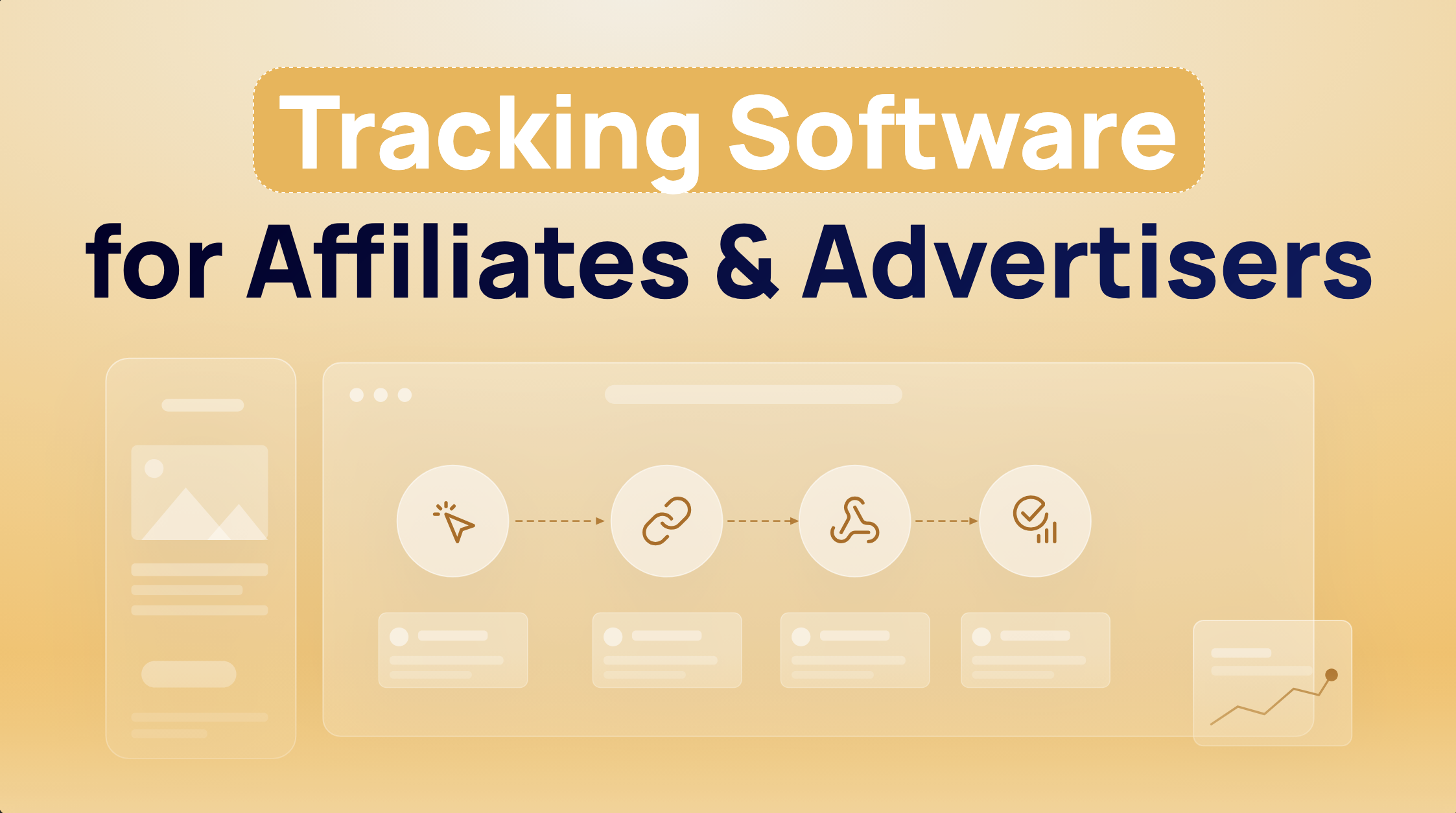
Affiliate software tracking is the system that captures a click, stores the identifiers attached to that click, waits for a conversion event, then matches the two under a set of attribution rules. In practice, it answers one question: which source, zone, SubID, and offer URL produced the payable action. A tracker like Keitaro or Voluum, or a network-native platform like Affise, does that matching continuously.
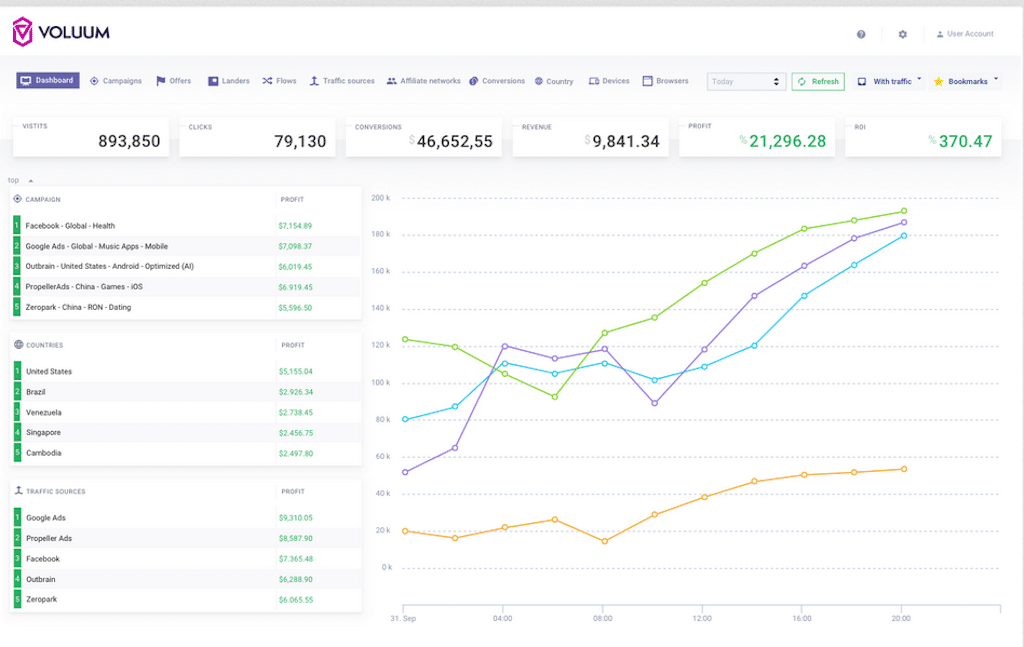
Most buyers think the tracker’s job starts at reporting. It doesn’t. The real work happens earlier, when the system decides what to keep and what to discard. If the click ID never persists, if the advertiser returns the wrong parameter name, or if the conversion ping fires against the wrong goal, the dashboard can still look “clean” while attribution quietly fails.
Without reliable tracking, three things break first:
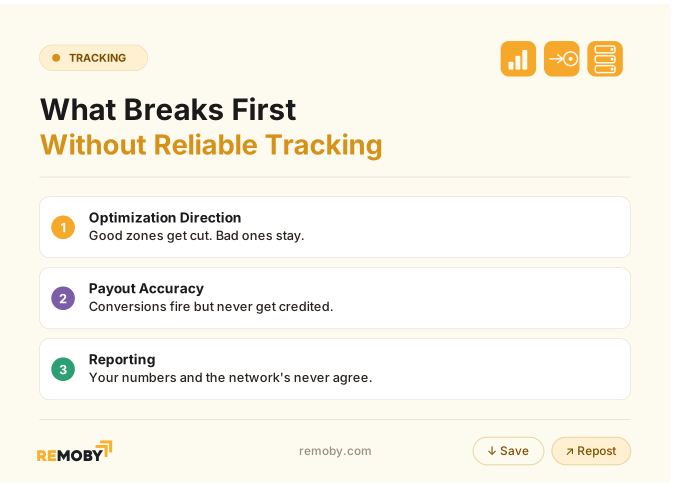
I spent two days debugging a postback mismatch once. The token fired. The redirect worked. One macro name was wrong by a single character, so the offer returned an empty click ID and the platform rejected every conversion.
That last point matters more than most glossaries admit. In performance buying, the tracker is not a notebook. It is the join layer between traffic and money. The moment money depends on the number, run S2S and keep the pixel as a cross-check. That rule comes from implementation reality, not theory.
What gets captured, stored, matched, and reported
A working setup captures more than a click count. It captures the join keys and the context around them.
At minimum, the platform needs to capture:
- click ID or external click reference
- campaign ID, source ID, zone ID, creative or SubID
- timestamp
- GEO, device, browser, OS
- landing page and offer URL path
- revenue, payout, and conversion goal
- transaction ID for dedupe
Storage comes next. The click ID has to survive the redirect chain and land somewhere durable enough to be returned later. That usually means first-party cookies, local storage, or server-side click storage. On Safari, iOS, and in-app browsers, browser persistence gets weaker fast. Pixel-only setups start under-reporting there first because the browser strips or blocks parts of the path before the conversion page ever loads (the docs won’t tell you this).
Matching is where the platform takes an incoming conversion event and tries to join it back to an existing click. If the click exists but the event arrives with a blank click ID, nothing matches. If the event arrives with the correct click ID but the wrong goal name, the tracker can log it under the wrong event or drop the revenue. Reporting sits at the end of that chain. It only shows what survived capture, persistence, and matching.
So when a zone in an ad network looks dead, the useful question is not “did it convert.” It is “did the conversion survive the chain back to the tracker.”
The click exists. The user converted. What decides whether that event becomes a row in the report is the audit path underneath.
The five audit checks: identification, persistence, matching, attribution, reporting
Affiliate software tracking audit means checking five linked controls: identification, persistence, matching, attribution, and reporting. Identification asks whether the click receives a unique ID. Persistence checks whether the ID survives the path to conversion. Matching confirms the conversion returns that same ID. Attribution applies the window and rules. Reporting verifies the credited event appears with correct goal and revenue.
Run the audit in this order:
- Identification. Click the live tracking link yourself and confirm the platform creates a click with source, GEO, device, and a unique click ID.
- Persistence. Inspect whether that click ID survives the redirect chain and sits in first-party storage or gets passed forward server-side.
- Matching. Trigger a test conversion and confirm the returned postback or pixel includes the same click ID.
- Attribution. Check the attribution window, event name, payout logic, and whether another click can steal the credit.
- Reporting. Verify the event lands in reports with the right goal, revenue, transaction ID, and timestamp.
Five checks, no shortcuts.
The expert benchmark here is practical: all five need to pass before launch, then a small live spend should reconcile within 5% between platform and source numbers. If you fail only the reporting layer, you have a cosmetic issue. If you fail identification or matching, you have a payout problem.
How Does Affiliate Tracking Work? Pixels vs S2S Postback
Affiliate tracking software works by creating a tracked click, attaching a click ID and source parameters to that click, preserving those values through the funnel, then returning a conversion event by pixel or S2S postback so the platform can match and credit it. Pixel tracking depends on the browser firing code on-page. S2S tracking sends the conversion from the backend, which is why it survives browser restrictions better.
Most explanations flatten the process into “click, cookie, sale.” The real path has more failure points than that. A redirect-heavy funnel drops parameters. An in-app browser strips storage. A deposit confirmed two days later cannot fire a browser pixel at all. Once you see the whole chain, the reason S2S becomes the default for payable events is obvious.
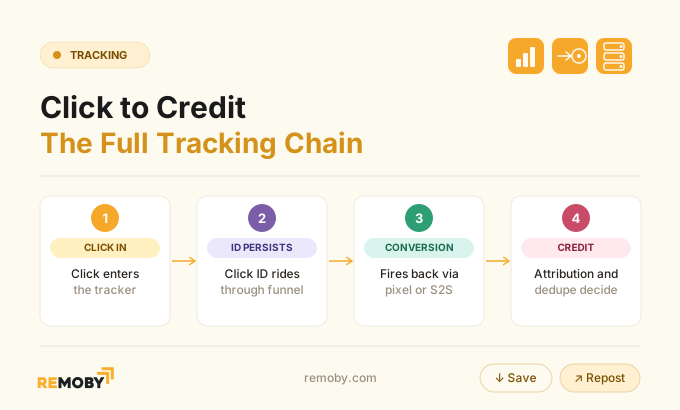
Step 1: Affiliate link click creates the tracking request
The first failure usually happens before the lander even loads. A tracking link from RedTrack, BeMob, or Affise receives the click and creates the initial request object. That object should log source, campaign, zone, SubID, device, timestamp, and destination.
If you buy pop traffic from Remoby or any other pop ad platform and append sloppy source parameters, the tracker still records the click, but not in a way that helps later optimization. You will see spend by campaign and lose the placement-level view that actually drives whitelist and blacklist decisions.
The request also decides where the click goes next. In a clean setup, the redirect chain stays short. Every extra hop is another chance to lose a macro, strip a parameter, or delay the page load enough that the user bounces before the offer URL resolves.
The click happened. But the platform has only created a candidate for attribution, not attribution itself.
Step 2: Click ID and campaign parameters are generated or passed through
Two identifiers matter more than the rest: the click ID and the transaction ID. The click ID gets created at click time or passed through from an upstream platform. It becomes the primary join key for later matching.
Most buyers assume any ID in the URL is good enough. Reality is uglier. The advertiser only returns the parameter name it was configured to read. If your tracker sends subid and the partner expects clickid, the click ID sits on the outbound offer URL, never gets stored on the advertiser side correctly, then comes back blank on the postback. A 400 error in raw intake logs often points to exactly that empty click ID on the incoming S2S call.
This is one of the three most common S2S misconfigurations, alongside click ID not populating at all and goal/event mismatch. The symptom in reports looks simple: clicks, no conversions. The mechanism underneath is not.
Step 3: First-party storage or cookies persist the visit
If you rely on the browser alone, persistence becomes the weak link. First-party cookies and local storage still do useful work, but they no longer deserve blind trust on Safari, iOS, or in-app webviews.
Pixel-only tracking breaks down fast in those environments because Intelligent Tracking Prevention and related restrictions shorten or block the persistence path. The user still moves through the funnel. The stored key disappears before the pixel fires. That is silent under-reporting, which is worse than a hard failure because it looks like normal variance.
Server-side click storage reduces that dependency. Cookieless tracking claims often overstate things, but the direction is right. The less your payable event depends on the browser remembering a value, the less fragile your attribution becomes.
Persistence sounds boring until you realize it decides whether the sale belongs to the whitelist or vanishes into unattributed noise.
Step 4: The user reaches the landing page and continues through the funnel
If you run a funnel with multiple prelanders, external offer pages, and a long redirect chain, parameter continuity becomes more important than page design. Each hop has to preserve the click ID and related SubIDs.
A common mistake in iGaming and Finance funnels is rebuilding the offer URL midstream without carrying forward the original tracking parameters. The lander works. The CR can even look fine in the advertiser panel. But the tracker loses continuity, so the buyer cannot map revenue back to source, zone, or creative.
For traffic managers, this is where source-quality arguments often go wrong. A placement looks weak because the last step broke parameter passing. The zone gets blacklisted for a funnel problem.
Step 5: A conversion event fires on the thank-you page or backend
A browser pixel is enough only when the payable event happens on a page the user actually reaches. The moment the event happens off-page, delayed, or server-confirmed, the pixel cannot carry the job.
That covers a lot of real affiliate cases: approved leads, confirmed deposits, repeat purchases, or backend validations that come hours or days later. A browser cannot fire code on a page that never loads. S2S can, because the advertiser sends the conversion ping from its backend when the event becomes real.
This is why hybrid setups win so often. Let the pixel fire as a diagnostic cross-check. Let the postback carry the payable truth.
Step 6: The system matches the conversion to the stored click ID
A conversion without a valid join key is not a conversion for attribution purposes. The platform receives an event and tries to find the click row that owns it.
When matching fails, inspect three things first:
- click ID field populated on the incoming event
- parameter name matches what the advertiser returns
- stored click exists within the expected window
If any of those fail, the event lands unmatched or gets rejected. This is where raw logs matter more than the report view. The UI only shows the missing output. The intake log shows the broken input.
The event arrived. Matching still failed. Attribution only starts after the system proves the event belongs to a real click.
Step 7: Attribution rules and windows decide whether the affiliate gets credit
A 24-hour dedupe window on the same click ID plus event combination is typical across platforms (industry benchmark). Attribution windows vary more, and that variation explains a lot of report drift.
If the user clicked two affiliate links, or if the same source triggered both a pixel and a postback, the platform needs rules. In many setups, whichever valid event arrives first and matches a stored click gets temporary credit, but S2S becomes the source of truth because the browser cannot be trusted consistently. That matters when reconciling numbers across Google Ads, Meta Ads, a tracker, and the advertiser CRM.
Another quiet failure sits here: goal mismatch. The postback fires, but the event name does not match any configured conversion slot. You see a ping in logs, no visible revenue in the report, and start blaming the traffic source.
Step 8: The conversion is recorded, deduplicated, and reported
Recording is not the last step. Deduplication sits between receipt and reporting, and it decides whether one real sale becomes one counted conversion or two inflated ones.
The primary dedupe key is a unique transaction ID. Without it, double-counting appears the moment both the browser pixel and the postback fire for the same event. The tracker sees two valid signals and has no clean way to know they describe one purchase. With a unique transaction ID, the platform rejects the second event carrying an ID it has already seen.
The practical benchmark is tight: after launch, small live spend should reconcile within 5% between the tracker and the source system. More drift than that usually means one of four things: duplicate events, dropped browser events, delayed postbacks outside the attribution window, or parameter mismatch.
Ready to launch with Remoby?
The Anatomy of an Affiliate Tracking Link
Click IDs, cookies, and postbacks work together by dividing jobs. The tracking link creates or passes the click ID and source parameters at the moment of the click. First-party cookies or storage persist that click reference through the funnel. The postback returns the conversion from the backend with the same click ID, while a transaction ID prevents double-counting. Each part handles a different failure risk.
That division of labor is why a tracker plus S2S postback plus transaction ID is the real minimum. The pixel helps diagnosis, but it is additive, not mandatory.
Tracking links and parameter passing
What most people call a “tracking link” is really a transport layer. Its whole job is to carry the right values through several systems without mutation.
A proper link passes source parameters, zone IDs, creative tags, and any required affiliate macros into the redirect chain, then into the offer URL. The quality of that parameter passing decides how useful your later reports become. If you collapse five placements into one generic SubID, no tracker can recover that lost granularity later.
This becomes especially visible on push and pop buys where zone variance is extreme. One placement can clear ROI while the next burns through the same funnel bundle with identical CPM.
Click IDs and why they are the primary join key
One ID joins the whole story together. That is the click ID.
Cookies help persistence, but the click ID does the actual matching work. It is the value the tracker expects to see again when the conversion returns. If you remember one technical rule from this whole article, keep this one: a conversion event with no valid click ID is a report row waiting to fail.
Some setups also pass external IDs from the traffic source. That can help reconciliation, but it does not replace the internal click ID created by the tracker. Use external IDs for cross-platform sanity checks. Use the tracker click ID for attribution.
The link can look perfect in the browser bar and still be broken for attribution if the join key never returns.
First-party cookies or storage for persistence
Browser storage still matters, but not as the final authority. It matters as the bridge between click and event in short, on-page flows.
If the funnel converts on the same day, on the same browser, and on a clean landing path, first-party cookies or local storage can persist the visit well enough to support a pixel. Once users switch browsers, delay the conversion, or move through hostile environments like in-app webviews, that bridge weakens. This is where most implementations break.
The fix is not abandoning browser storage. The fix is refusing to treat it as the only surviving copy of attribution data.
Conversion events and attribution windows
When buyers complain that numbers “do not match,” the disagreement often starts here, not at the click. The event did happen. Different systems disagree about whether it counts now, counts later, or counts at all.
Conversion event design needs three things aligned:
- the event name or goal slot
- the timestamp that determines window eligibility
- the payout or revenue value attached to the event
A delayed approved lead from MaxBounty or ClickDealer can fall outside one platform’s window and inside another’s. A confirmed deposit can post hours later by S2S and overwrite a browser-event assumption. Once you compare systems with different timing logic, small report drift stops being mysterious.
The identifiers are in place. The harder part is choosing which system gets to decide what a “real” conversion is.
S2S Postback: How Server-Side Tracking Works for Affiliates
S2S wins whenever the conversion matters enough to pay on. The advertiser backend fires a postback to the tracker with the click ID, event name, payout, and ideally a unique transaction ID. No browser needs to stay open. No thank-you page has to load.
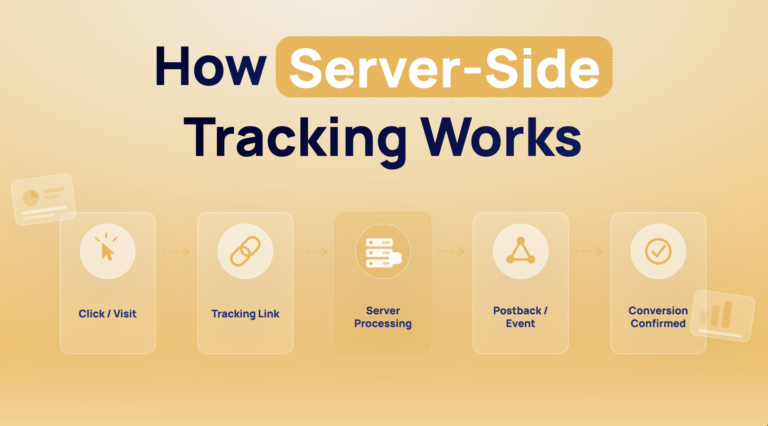
That changes the failure profile completely. Ad blockers cannot block a server call between two backends. Safari cannot strip a value it never has to store. A delayed deposit confirmation can still be recorded days later because the event source is the advertiser database, not the user’s session. The full event flow, field by field, is in how server-side tracking works blog.
The most common break in S2S is still basic: empty or malformed click IDs. The postback reaches the platform, often returns a 400 error, and never matches. When that happens, inspect the inbound URL and compare the returned parameter name against the original offer URL mapping.
What Is a Postback URL and How Do You Set One Up?
A postback URL is the endpoint the advertiser or affiliate network calls when a conversion happens. The postback URL setup only works when the outbound click sends a click ID the advertiser stores, then the advertiser returns that same value to the postback endpoint on conversion.
Set it up in this order:
- Generate the tracker click URL with the correct click ID token.
- Append the right parameter name to the offer URL so the advertiser stores it.
- Build the postback URL in the tracker with placeholders for click ID, payout, event, and transaction ID.
- Place that postback URL in the advertiser or affiliate network panel.
- Run a test click, then a test conversion, and inspect raw logs before spending live budget.
That order prevents most avoidable errors.
Wrong parameter names break more postback url setups than missing documentation ever will. If the tracker expects {clickid} back and the partner returns {subid}, the system behaves as if the sale never happened.
The Minimum Tool Stack for Reliable Tracking for Affiliates
Affiliate tracking minimum stack is smaller than many software comparison pages suggest. A reliable setup needs a tracker or network platform to create and log clicks, an S2S postback path to receive backend conversions, a unique transaction ID to dedupe repeated events, a persistence layer for short-path browser continuity, and reporting that exposes raw clicks and raw conversion logs. A browser pixel helps validation, but the stack can work without it.
That is the mechanism-first answer. Not every campaign needs an expensive SaaS stack on day one. Every campaign that pays on conversions needs a trustworthy match path.
Minimum stack: tracker or network platform, tag management or pixel deployment, first-party storage, conversion event source, and reporting
Minimum stack for accurate click and conversion tracking is tracker plus S2S plus transaction ID, with browser storage and a pixel as supporting layers. The tracker creates the click ID and logs the visit. Browser storage preserves short-session continuity. The conversion event source sends the postback. The transaction ID dedupes duplicate fires. Reporting proves whether the match actually happened.
Here is the practical version:
| Function | Minimum tool | Why it exists |
|---|---|---|
| Click creation and logging | Keitaro, Binom, Voluum, RedTrack, or network-native tracker | Generates click ID and stores source context |
| Conversion receipt | S2S postback endpoint | Accepts backend conversion events reliably |
| Persistence | First-party cookies or server-side click storage | Bridges click to conversion in-session |
| Deduplication | Unique transaction ID | Stops double-counting when both methods fire |
| Validation | Browser pixel or test event tool | Cross-checks on-page event behavior |
| Reporting | Raw click and conversion logs | Shows why mismatches happen |
| Verdict | Tracker + S2S + transaction ID | Real minimum for payable events |
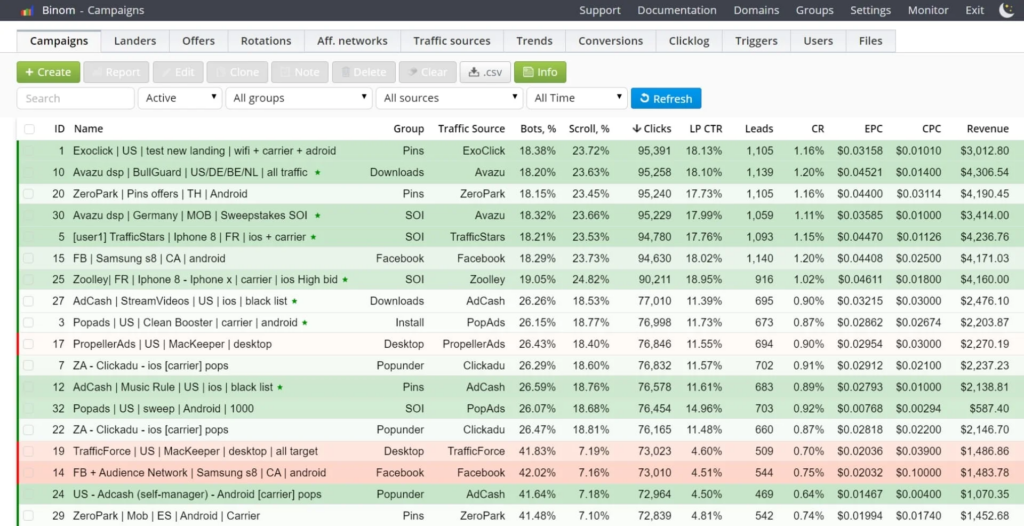
Stack matrix: which tool handles which tracking function
Four common tools cover most affiliate stacks, but they solve different parts of the problem.
| Tool type | Handles well | Fails when used alone | Good fit |
|---|---|---|---|
| Self-hosted tracker like Keitaro or Binom | Click logging, routing, raw data control | Needs proper server setup and postback wiring | Pop, push, aggressive arbitrage workflows |
| Cloud tracker like RedTrack or Voluum | Fast setup, integrations, automation | Costs more as volume and event count grow | Teams trading speed for convenience |
| Network-native tracker like Affise or Impact | Partner-side attribution, payout logic | Less flexible for deep funnel debugging | Affiliate program operators, direct offers |
| Tag deployment layer like Google Tag Manager | Pixel deployment and event testing | Cannot replace tracker matching or S2S | Supporting browser-side QA |
| Verdict | Use one tracker as source of truth | Do not split attribution ownership | Cleaner reconciliation |
A lot of confusion starts when teams expect Google Tag Manager or an advertiser CRM to behave like an affiliate tracker. They are adjacent systems, not substitutes. The tracker owns click creation and attribution logic. The CRM owns business events. The tag layer helps the browser fire the pixel. Once two systems both think they own crediting, reconciliation turns into guesswork.
The stack can be lean. The harder choice is not which tool to buy first. It is which system gets final authority when the numbers stop agreeing.
A practical next step is choosing the tracking method that fits the event reality and failure budget.
Pixel vs S2S postback vs hybrid tracking
Pixel-based affiliate tracking is not enough when the conversion happens off-page, after a delay, inside Safari or iOS-heavy traffic, or through funnels where browser storage and pixel fires drop too often. Pixel tracking depends on the browser completing the last step. S2S does not. A confirmed deposit two days later is the clean example: the browser is gone, the backend event still exists.
Most teams start with pixel-only because it is visible. You can fire the pixel, inspect the page, and feel like the setup is proven. The problem is that visibility is not reliability. Pixel-only works for short, clean funnels where the thank-you page loads in the same session and the payable event happens immediately. It breaks when the event moves even slightly away from that ideal path.
The practical rule is blunt because the mechanism is blunt: when money depends on the number, run S2S and keep the pixel as a cross-check. The browser is an observer. The backend is the event source.
Comparison table: pixel-only vs hybrid vs S2S
A 5% reconciliation gap is the upper limit most teams treat as healthy between source and tracker counts (industry benchmark). Method choice decides how quickly you drift past it.
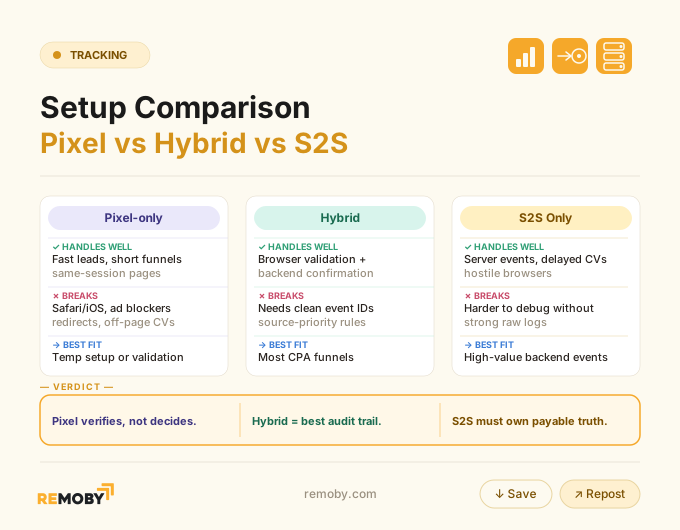
Hybrid wins so often because it separates jobs correctly. The pixel shows whether the on-page event happened. The postback tells the tracker whether the payable event became real. Without that split, one noisy browser session can distort an otherwise good whitelist.
The method choice looks like a tooling decision. It is really a failure-budget decision.
When pixel-only is enough, when hybrid is safer, and when S2S is necessary
What most buyers assume is that pixel-only and S2S differ mainly in setup effort. In practice, they differ in what kind of failure you are willing to tolerate.
Use pixel-only if all three conditions hold:
- The conversion happens on-page, immediately, in the same session.
- The funnel has minimal redirects and stable parameter passing.
- Losing a slice of attribution does not change payout or optimization decisions.
Use hybrid when one of those starts weakening. Pop traffic often lands here first. A user opens the lander, bounces in and out of a prelander, then returns through a messy redirect chain. The pixel might still fire, but the odds of losing the original click ID rise with every hop.
Use S2S when the conversion gets approved later, when the advertiser backend decides whether the event counts, or when Safari, iOS, and in-app browser volume becomes material. That threshold arrives faster than many buyers expect on push, pop, and social traffic.
I have seen clean-looking hybrid setups undercount harder than raw S2S because the team trusted the pixel discrepancies as “normal variance.” The intake logs showed blank click IDs for 18% of approved events. The browser was not the issue. The return mapping was.
That is why method choice should follow event reality, not setup convenience. An iGaming deposit flow from PopAds, Clickadu, or Remoby, a hybrid SmartCPM + RTB system with direct publisher relationships, needs S2S from day one because the payable event often gets confirmed later.
Ready to launch with Remoby?
How browser restrictions and consent loss change the method choice
Server-to-server affiliate tracking reduces attribution loss from browser restrictions because the recorded conversion comes from the backend, not from a browser cookie or page-level pixel fire. Browser rules still affect click-side persistence, but S2S removes the most fragile part of the chain: the browser having to remain present when the conversion happens. Safari traffic and in-app webviews show the difference fastest.
Consent loss changes the setup in a more specific way than most articles admit. It does not only lower measurement volume. It changes which signals still exist at all. A pixel that depends on page execution, storage permission, and a final page view loses three chances to survive. An S2S postback depends on one thing: the backend sending a valid conversion ping with the right click ID.
That does not make S2S magical. If the click ID never reached the advertiser or got stored under the wrong parameter name, the backend returns an empty value and the tracker rejects it, often with a 400 error in the raw intake log. But the failure surface is smaller. You remove browser execution, third-party restrictions, and ad blocker interference from the final conversion step.
Affiliate Tracking for Pop Traffic: Key Parameters and Macros
If you buy pop traffic without passing zone, source, and click-level macros cleanly, the tracker will still log spend while hiding the placement-level leak.
Pop traffic compresses the user journey. There is less time to persist identifiers, fewer chances to recover missing values, and more zone variance than on slower formats. That puts extra weight on the outbound URL. At minimum, pass the tracker click ID, source, campaign, zone, creative or SubID, and any external placement token you need for reconciliation.
The macro logic matters because pop optimization lives or dies at zone level. One campaign can hold a decent EPC overall while three placements burn half the spend. If the zone token arrives malformed, you lose the ability to blacklist accurately and start blaming the whole traffic source.
Use this capture order:
- Generate an internal click ID at the tracker level.
- Append source and zone macros to the tracking link.
- Pass the same click ID forward on the offer URL under the exact parameter name the partner expects.
- Return that value on the postback with payout, goal, and transaction ID.
The short version: macros are not reporting decoration. They are the join map between spend and payout.
The campaign can have perfect CR on the advertiser side and still be unoptimizable if the zone data dies in transit.
Ad Tracker vs Affiliate Tracker: What’s the Difference?
A tracker built for ad-side routing solves a different problem than a platform that owns affiliate crediting, payout logic, and partner-facing attribution.
The overlap confuses people because tools like Keitaro, Binom, Voluum, and RedTrack do both parts unevenly. Ad trackers focus on click capture, routing, lander rotation, rules, and raw traffic diagnostics. Affiliate trackers or network-native platforms like Affise and Impact care more about partner attribution, conversion acceptance, dedupe, and commission logic.
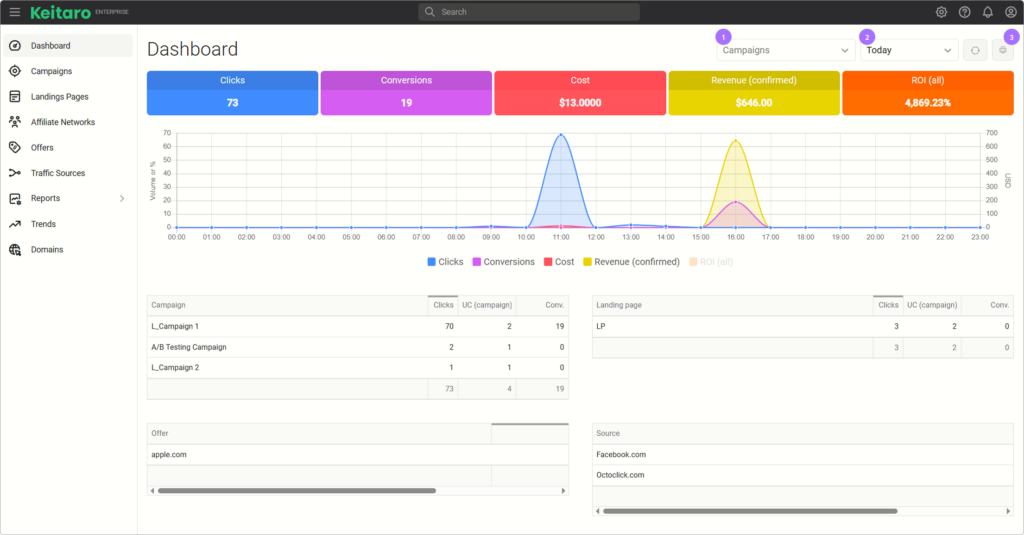
The useful distinction is operational. If you need to split-test a prelander bundle, rotate offers, and inspect raw click paths from PropellerAds or HilltopAds, the ad tracker does the heavy lifting. If you need to decide which affiliate gets paid for a backend-approved event and reject duplicate conversion pings, the affiliate layer owns that decision.
Problems start when teams let both systems think they are the source of truth. One credits on pixel fire. Another credits on postback arrival. Analytics logs a third number. Suddenly the dashboard argument is about “which platform is right” when the real question is which system had final authority configured. (the docs won’t tell you this)
The tools can coexist. The authority cannot stay ambiguous.
First-Click vs Last-Click Attribution: Which Model Fits CPA Campaigns?
Last-click usually fits CPA buying better because most affiliate stacks, traffic sources, and payout logic are built to credit the most recent valid click tied to the conversion.
That does not mean first-click is useless. First-click helps when you want to measure prospecting value across a broader funnel, especially if search or social opens the path and pop or push closes it later. But payable affiliate events rarely wait for philosophical attribution debates. They need one rule that can survive disputes over ownership.
For CPA campaigns, last-click stays cleaner for three reasons:
- It matches how most affiliate platforms credit by default.
- It reduces partner disputes when multiple traffic sources touch the same user.
- It aligns better with fast optimization at zone and SubID level.
First-click becomes interesting when your funnel has long consideration cycles and you control enough of the stack to compare upper-funnel sources against closed revenue. Even then, keep payout logic separate from analysis logic. Let the platform pay on one deterministic model. Do the deeper attribution study in analytics or backend BI.
Attribution model choice sounds strategic. In live CPA operations, it usually decides who starts the reconciliation fight.
Deduplication and cross-platform conversion matching
Duplicate fires do not inflate numbers by accident. They inflate numbers because two valid events arrive, both look real, and the system lacks a clean rule for rejecting the second one.
Cross-platform matching gets harder the moment you run a pixel, an S2S postback, an analytics event, and a CRM approval state for the same conversion. Each system records a different stage of reality. The only way to keep that manageable is to decide which identifier owns dedupe and which source owns final truth.
Deduplication keys, event IDs, and source priority rules
A 24-hour window on the same click ID plus event combination is common dedupe logic across platforms (industry benchmark). The stronger key is the transaction ID.
If both the pixel and the postback fire for one deposit or approved lead, the platform needs two filters. First, it checks the transaction ID. If it already saw that ID, it rejects the second event. If transaction ID is missing, it falls back to weaker logic like click ID plus event name plus time window. That works until the same user triggers repeated valid actions, or until two systems send the same event with slightly different timestamps.
Source priority rules matter next. Many stacks temporarily credit whichever event arrives first and matches a stored click, then treat S2S as the source of truth because the browser can be blocked or delayed. That rule avoids false duplicates while still letting the pixel serve as a diagnostic layer.
Set priority in this order:
- Transaction ID decides duplicate vs unique.
- Valid click ID decides matchability.
- Source priority decides which event becomes canonical.
- Time window decides whether the event is still eligible.
No transaction ID, no clean dedupe. That problem stays hidden until volume rises.
Why affiliate platform, analytics, and backend numbers differ
Three systems can all be “right” and still disagree because they count different moments.
The affiliate platform counts attributed conversions that passed click matching, window rules, and dedupe. Analytics platforms often count browser events, including some that never become payable. The advertiser backend counts business outcomes after approval, fraud checks, reversals, or delayed validation. This is why a tracker can show 94 conversions, Google Analytics shows 101, and the advertiser CRM approves 89.
The gap becomes suspicious when it exceeds 5% for small controlled spend (industry benchmark). Under that, timing and model differences explain a lot. Over that, start checking for missing click IDs, blocked pixels, duplicate event fires, or mismatched goals.
Those three questions usually resolve the argument faster than another screenshot ever will.
Common affiliate tracking failures and how to diagnose them
Most broken setups fail in one of three places: the click stops being identifiable, the identifier stops persisting, or the conversion arrives in a form the tracker cannot accept.
That sounds neat on paper. In live funnels it looks messier. Clicks show up, the offer converts in the partner UI, and your tracker stays empty. Or the tracker logs conversions, but wrong goals and zero revenue make the EPC useless. Diagnosis starts by locating which layer lost the chain.
Identification failures: missing click IDs, broken redirects, wrong parameter names
The most common S2S failure is boring and costly: the postback arrives with an empty click ID.
Check the outbound offer URL first. If the tracker sends subid and the partner stores click_id, the value never comes back correctly. Next, inspect the redirect chain. Long chains often strip parameters on one intermediate hop, especially when a lander rebuilds the offer URL manually. Finally, confirm the tracker created the click in the first place with the expected source and SubID values.
A useful tell sits in raw logs. If the platform returns a 400 on incoming postbacks, blank click ID is near the top of the suspect list. Reports will not show you that mechanism. Intake logs will.
Persistence failures: cookie loss, storage resets, browser restrictions, ad blockers
If the identifier exists at click time and disappears before conversion, storage failed.
Safari, iOS webviews, aggressive privacy modes, and ad blockers all shrink the useful life of browser-side persistence. Pixel-only setups hide this badly because nothing looks technically broken. The event happened. The browser never delivered a durable key back to the tracker. Redirect-heavy funnels make it worse by stretching the path between click and conversion. (this is where most implementations break)
The fix is structural, not cosmetic. Move payable attribution to S2S, shorten the redirect chain, and keep browser storage as support for same-session diagnostics.
Conversion reporting failures: goal mismatch, missing postbacks, delayed events
A valid conversion can still disappear after matching if the event lands against the wrong goal or arrives outside the attribution window.
Goal mismatch is common when the advertiser returns sale and the tracker expects deposit, or when payout is attached only to one configured event slot. Missing postbacks are easier to spot: no incoming conversion ping at all. Delayed events are sneakier. Approved leads from ClickDealer or MaxBounty can post hours or days later, long after a browser pixel would have had any chance to fire.
I once chased a “dead” source for half a day before finding the offer was posting to a test goal with zero payout. The traffic was fine. The event mapping was not.
The event can be real and still useless for optimization if the wrong goal owns it.
Pre-launch validation and QA workflow
Deduplication testing works when one controlled conversion intentionally fires twice, with the same click ID and transaction ID, and the platform records only one payable event while logging the second as duplicate or rejected. That test proves more than pixel presence. It proves the tracker can protect reporting when browser and backend events both arrive.
Pre-launch QA should feel repetitive. That is the point. Most tracking failures come from one wrong parameter name, one missed goal slot, or one uncaught duplicate path. A clean workflow catches those before the first real traffic pour.
Click-path test: confirm parameter capture and storage
Failure here means every later test is theater.
Run one live click through the final tracking link. Confirm the tracker logs the click with source, GEO, device, campaign, zone, and a unique click ID. Inspect whether the click ID persists through the redirect chain and appears on the offer URL under the correct parameter name.
Conversion test: validate pixel fire or postback receipt and click ID match
Use a controlled test event and inspect raw logs, not only the UI.
Trigger a conversion. If you use hybrid, verify the pixel fired and the postback arrived. Confirm both carry the same click ID. Check goal name, payout value, timestamp, and whether the event matched the stored click instead of landing unmatched.
Deduplication test: trigger controlled duplicate events and verify one recorded conversion
One duplicate test prevents a lot of fake profit.
Fire the same conversion twice with the same transaction ID. Then repeat with changed transaction ID but same click ID and event. The first pair should count once. The second test shows how your fallback dedupe behaves when transaction ID logic is absent or weak.
Launch checklist: logs, reporting reconciliation, and fallback alerts
Five checks need to pass before launch:
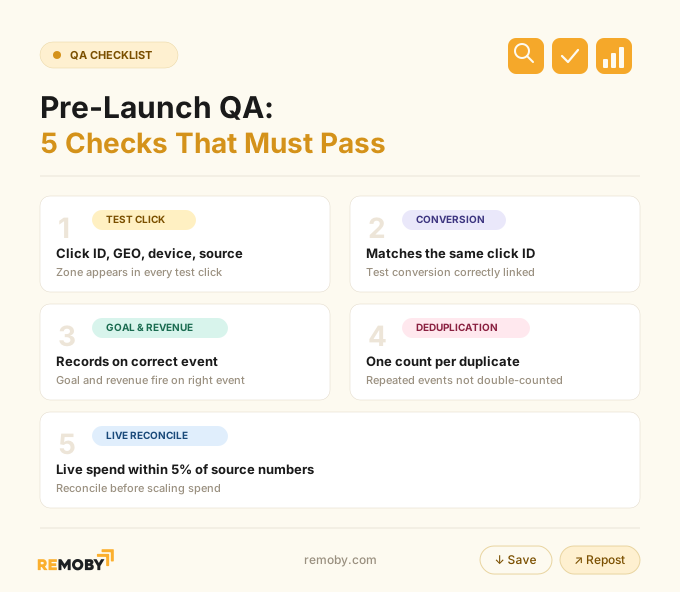
Set one fallback alert as well: if clicks continue and postbacks drop to zero, you want to know within minutes, not after a burned day of spend.
Ready to launch with Remoby?
FAQ for affiliate tracking software
Affiliate software tracking is the system that creates a tracked click, stores the identifiers attached to that click, receives a conversion event later, and applies attribution plus dedupe rules so the right source gets credit. In practice, affiliate software tracking decides whether spend, payout, and source data can be matched to the same user journey.
Affiliate software tracking works by generating or capturing a click ID on the initial click, passing that value through the funnel, storing it long enough to survive the visit, then matching a later pixel fire or S2S postback against the stored click. The platform then applies window, goal, and dedupe rules before recording the conversion.
Affiliate software tracking needs a tracker or network platform to create and log clicks, an S2S postback path to receive backend conversions, a unique transaction ID to dedupe repeated events, and raw reporting to inspect unmatched clicks and rejected postbacks. A browser pixel helps with QA, but it is additive rather than mandatory.
Pixel-based affiliate tracking is not enough when conversions happen off-page, after backend approval, inside Safari or iOS-heavy traffic, or in funnels where ad blockers and browser storage loss create silent under-reporting. In those cases, pixel-only cannot reliably carry payable attribution, so S2S needs to own the counted conversion. The setup was never "fine" because the dashboard looked populated. It was fine only when the same click ID survived the route out, the event back, the dedupe check, and the payout rule. Once that chain holds, the missing conversions stop looking mysterious. They stop disappearing because the system finally has the proof it needed all along.