Updated: July 6, 2026
|
10 min read
Updated: July 6, 2026
|
10 min read
How Server-Side Tracking Works in Affiliate Marketing

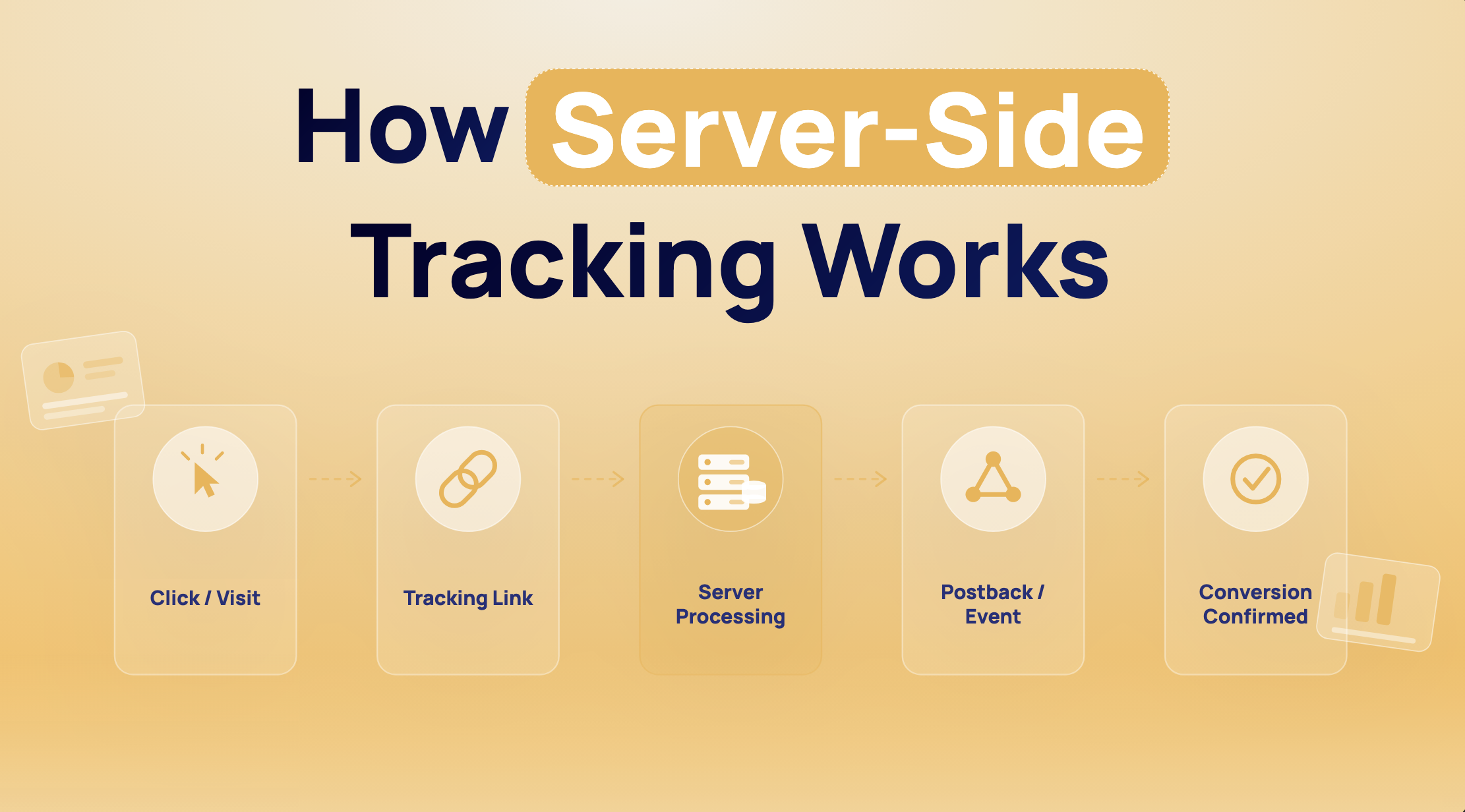
An affiliate’s nightmare: the click happened, the lead happened, the dashboard still shows zero. That gap is the whole story behind how does server-side tracking work in affiliate marketing. The system rarely fails at the conversion page. It usually breaks one step earlier, when the click ID stops moving through the chain.
How does server-side tracking work in affiliate marketing?
Server-side tracking in affiliate marketing works by attaching a unique click ID to the outbound affiliate click, storing or passing that ID through the funnel, and then sending it back in a server-to-server postback when the conversion happens. The network matches that returned ID to the original click and credits the right affiliate, zone, or sub ID. For example, when a lead from a bridge page reaches the advertiser, the backend fires the postback, and the network logs the conversion against the original visit.
Postback is the visible part. The fragile part is the handoff before it.
What server-side tracking means in affiliate marketing
Without S2S, the browser carries too much weight. A pixel has to fire, JavaScript has to load, the browser has to allow the storage, and the thank-you page has to behave. In affiliate traffic, especially with long funnels or third-party offer pages, that stack breaks often.
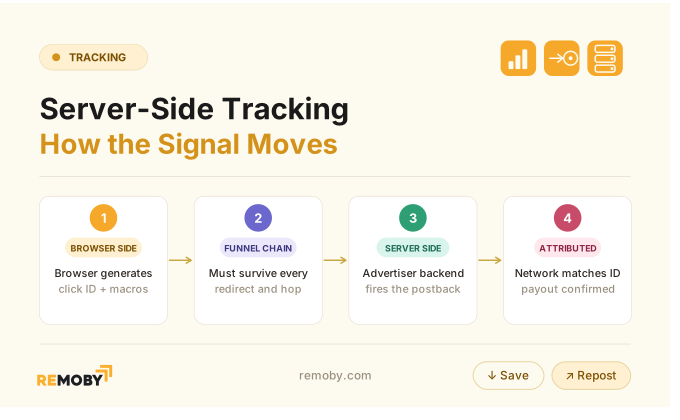
Server-side tracking software moves the conversion message off the browser. The click still starts in the browser, but the conversion confirmation comes from the advertiser’s backend to the network through a postback. Match rate usually improves as a result. Ad blocker interference and client-side JS failures on the offer page drop out of the equation.
The important part is what it does not move. The click ID still has to survive the landing page, prelander, redirect chain, and form flow. So, the browser is no longer the messenger. But it still handles the first handoff, and that is where many funnels leak.
Server-side vs client-side tracking in affiliate attribution
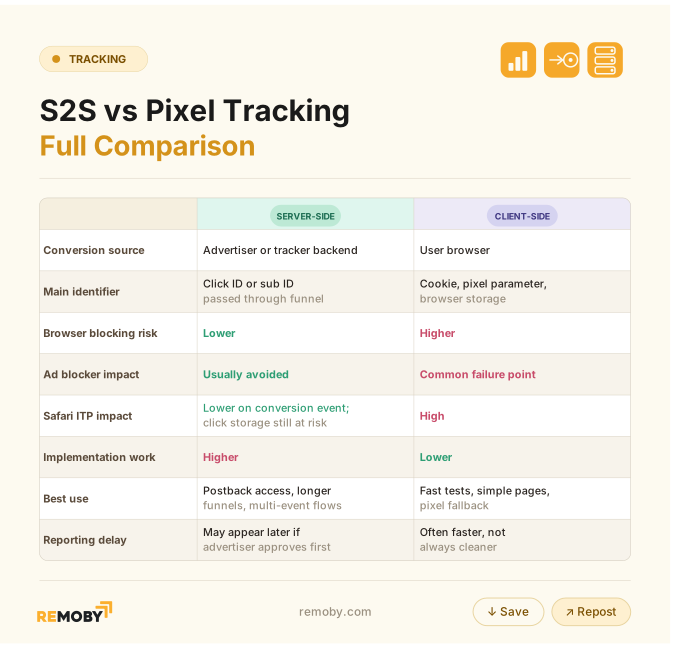
Most people frame this as cookies versus no cookies. The real difference sits in where the conversion event gets confirmed.
Client-side tracking always depends on browser actions.
- A pixel fires on page load or form completion.
- Cookies or local storage hold the identifier.
- Safari’s Intelligent Tracking Prevention can shorten cookie life to as little as 24 hours, which matters when your click-to-conversion window runs longer than one session.
Server-side tracking depends on backend actions.
The advertiser or affiliate tracker records the conversion server-side and fires the postback with the click ID, tid, payout, or status fields.
When I was just a noobie, I spent two days debugging a postback mismatch once. The token was firing. The macro was wrong. One character.
Reliability improves after the conversion event moves server-side. Attribution still depends on the identifier making it there intact.
Choosing S2S is easy. Designing the event chain so the ID survives is the harder part.
The exact event flow from ad click to conversion report
Affiliate server-side tracking follows a fixed sequence: click, click ID creation, ID capture, ID storage or passthrough, conversion event, postback fire, and network matchback. The network does not infer attribution from the sale alone. The network needs the same click ID it issued at click time.
Here is the working flow in practice:
- A user clicks an affiliate link from Meta Ads, Google Ads, Remoby (push and pop network with direct publisher relationships in Tier-2 and Tier-3 GEOs), or another source.
- The affiliate network or tracker appends a click ID or sub ID macro to the URL.
- The landing page captures that value from the query string.
- The page stores it in a first-party cookie, hidden form field, or server session. Good setups also pass it in the URL as fallback.
- The user moves through the funnel to the offer page or form.
- The conversion happens. For lead gen, this is often registration. For ecom, it is usually order creation or approved sale.
- The advertiser backend fires the postback to the affiliate network with the click ID and any extra fields.
- The network matches the click ID to the original click and writes the conversion to reporting.
Short chain, many break points.
The full path looks linear on paper. In live traffic, the weak link is usually the storage and pass-through layer.
What you need for a minimum viable affiliate server-side tracking setup
Minimum viable setup means three required parts: click ID capture at the landing page, a backend event that can fire the postback on conversion, and the postback URL registered in the affiliate network with the correct macro mapping. Optional parts depend on the offer. Example: flat CPL often works with click ID alone, while iGaming needs status and event type to separate registration from FTD.
Those three parts come directly from hands-on S2S setups across affiliate stacks. Remove any one and matchback breaks.
What changes by offer type:
- Flat CPL: click ID is mandatory, payout is often fixed in-network.
- Variable CPA or rev share: payout value matters.
- iGaming: status flag matters because pending and approved events pay differently.
- Multi-event offers: event type matters for registration, FTD, redeposit, or upsell.
The lean setup is enough to track one event. The moment the offer pays in stages, field design starts to matter.
| Component | Required | Where it lives | What it does |
|---|---|---|---|
| Click ID or sub ID | Yes | Affiliate link and LP | Matchback key |
| LP capture logic | Yes | Landing page | Reads query params |
| Storage method | Yes | Cookie, session, hidden field | Keeps ID alive through funnel |
| Conversion trigger | Yes | Advertiser backend or CRM | Decides when to fire postback |
| Registered postback URL | Yes | Affiliate network panel | Receives conversion data |
| Payout field | Depends | Postback | Needed for variable payouts |
| Status field | Depends | Postback | Needed for pending or approved logic |
| Event type | Depends | Postback | Needed for multi-event offers |
| Order ID or tid | Optional but useful | Postback | Deduplication key |
| Test logs | Yes | Tracker, server, network | Validation and debugging |
Ready to launch with Remoby?
What a postback URL sends back to the affiliate network
Postback URL data usually includes the click ID, conversion status, payout, transaction ID, currency, and timestamp. The click ID is the matchback key. The other fields explain what happened to that click and how much to credit. A postback link in Remoby looks like this:
http://trk-web.com/conv?source=Advert_ID&clickid={ClickID}&revenue={amount}&transaction_id={trx}
Field by field:
{ClickID}Replace with the macro to send conversions to Remoby’s tracker.{amount}Replace with the macro to send the conversion cost.{trx}Replace with the macro to send a unique event / transaction id.
Most networks also log the raw received postback, including blank parameters. If the network receives the postback with a blank match key, the system is not confused. It is doing exactly what you sent.
Read about how to set up postback in Remoby in our FAQ for Advertisers.
How to capture and pass a click ID through a landing page and conversion path
Click ID capture starts on the first landing page request. The page reads the tracking parameter from the URL, stores it, and passes it forward on every next step until the conversion backend can reuse it.
This is where most broken setups actually break. The click ID reaches the LP but not the conversion page. Practitioners consistently flag this as the most common reason conversions fail to match back.
A safe pass-through pattern:
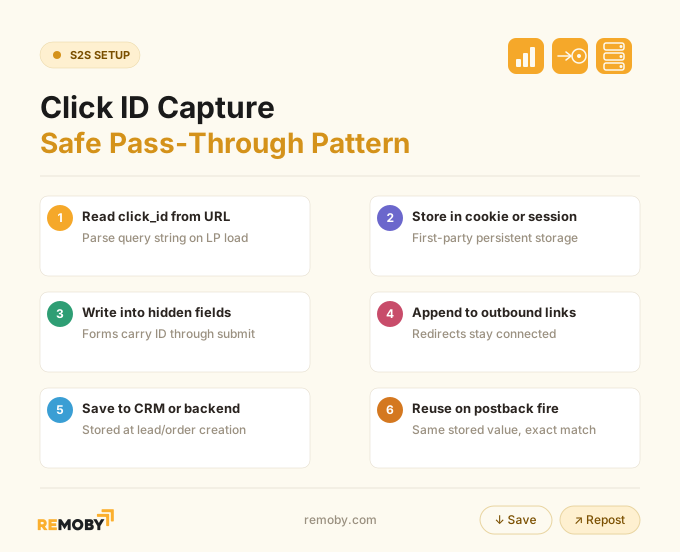
URL passthrough matters because Safari and Firefox can expire storage earlier than you expect.
How to validate affiliate postback tracking before sending real traffic
Validation works when you test the whole chain, not one screenshot inside a tracker. Create a single test click and follow that ID until the network reports the conversion.
- Generate a test click with a visible click ID or sub ID.
- Confirm the parameter lands on the LP URL.
- Check browser storage, hidden fields, or server logs to confirm the ID was saved.
- Complete a test lead or sale using that same path.
- Inspect the outbound postback request and response code.
- Check the affiliate network conversion log for the same click ID, tid, and status.
How to check that the network received the exact value the backend sent? Three key players here:
- Browser dev tools catch the LP side
- Command-line requests or Redirect Detective help inspect redirect stripping
- Network logs confirm whether the postback arrived with empty or malformed parameters.
A green response code only proves the request left your server. It does not prove the network matched it.
Common reasons affiliate conversions fail to match back
Conversion matchback fails most often because the network never gets a usable match key. Everything else comes after that.
The common failure modes:
- Click ID never entered the offer URL chain.
- Redirect stripped the parameter.
- LP stored the wrong value or overwrote it.
- Postback macro mapped to the wrong field.
- Click ID format changed through encoding or truncation.
- Postback fired before the backend saved the ID.
- Duplicate events fired with the same tid.
- Approval logic delayed or rejected the payout event.
“No matching click” usually means format mismatch, not a mysterious network problem. Check redirect hops first, then stored value, then raw postback log. (the docs tend to skip this part)
Once you know where matchback fails, the next question is bigger: what S2S can repair, and what it never will.
| Symptom | Likely cause | Where to check | Fix |
|---|---|---|---|
| No matching click | Blank or wrong click ID | Raw postback log | Correct macro mapping |
| Some zones convert, others don’t | Parameter stripped on one path | Redirect chain by source | Check every redirect hop |
| Clicks logged, no leads | ID lost after LP | Hidden fields or CRM record | Pass ID through every step |
| Duplicate conversions | No dedupe key | tid or order_id handling | Add order ID and dedupe rules |
| Network shows pending only | Status never updated | Approval workflow | Fire approved event separately |
| Tracker and network disagree on time | Delayed backend confirmation | Timestamp fields | Reconcile by tx_time and status |
What server-side tracking improves and what it cannot fix
Server-side tracking software improves conversion reporting reliability by moving the event off the browser, but it does not fully solve attribution loss. It helps when pixels fail, ad blockers interfere, or browser rules block client-side storage. A missing click ID, missing consent basis, or timing gaps between when a network logs a postback and when an advertiser approves it sit outside what S2S can fix. Example: a lead can appear instantly in the network while the CRM approves it hours later.
That distinction matters because buyers often expect S2S to recover every lost conversion. It cannot. If the click ID was lost in the redirect chain, there is nothing to stitch back together. If the offer requires consent and the legal basis is missing, moving the event server-side changes nothing.

Real affiliate tracking flows by traffic path and offer type
If you run paid traffic through a bridge page, you usually manage two attribution chains at once. The paid platform needs its own signal on the LP, often via Meta Conversions API or Google Ads tagging, while the affiliate network needs the click ID returned on conversion.
Direct-link flow is simpler and weaker. You send traffic straight to the affiliate link, the network can still attribute via click ID, but the paid platform gets no LP event back. That leaves your optimization blind. With a bridge page, you can fire CAPI or a pixel fallback on the LP and still preserve the affiliate postback path.
Offer type changes the postback design:
- Finance or Social CPL: one registration event, often flat payout.
- Ecommerce sale: sale event plus payout and order ID.
- iGaming: separate event types for registration, FTD, and redeposit, often with status logic.
- Hybrid CPA plus rev share: payout field becomes dynamic, not fixed.
In hybrid SmartCPM and RTB systems, like the kind Remoby uses for push and pop inventory, this matters because zone-level optimization depends on clean sub IDs coming back from the offer side. Clean traffic logs mean very little if the postback chain drops the identifier before approval.
The setup looked broken from the dashboard. The mechanism underneath was not broken at all. The click ID was gone long before the postback had a chance to succeed.
Ready to launch with Remoby?
FAQ: how server-side tracking works
Server-side tracking software sends the conversion event from the backend to the affiliate network through a postback. Client-side tracking sends the event from the user's browser through a pixel or script. In practice, S2S survives blockers and browser limits better, while client-side stays useful as a fast pixel fallback.
Hybrid tracking combines S2S postbacks with client-side pixels or CAPI events so different systems get the signal they need. Affiliates use it when the network needs a click-ID matchback, while Meta Ads or Google Ads still need LP or conversion events for optimization. Dedupe keys like tid keep reports cleaner.
Direct affiliate links pass the click straight into the network flow, which keeps the path short but gives the paid source almost no on-page attribution signal. Bridge-page flows add one more step, but they let you capture the click ID, fire platform events, test angles, and control pass-through quality.
Offer logic determines the fields. Flat CPL usually needs one event and one click ID. iGaming, rev share, and staged payout offers need more structure because the network has to tell registration from approved FTD, separate redeposits, and apply the right payout or status to each event.

![Best GEOs for Affiliate & Betting Campaigns [2026]: Score Markets by Regulation, Payout & Fit](https://remoby.com/wp-content/uploads/2026/03/Best-GEOs-for-Betting-Campaigns-768x432.jpg)