Updated: August 24, 2026
|
14 min read
Updated: August 24, 2026
|
14 min read
Pop Ads Campaign Setup: A Tracking-First Launch Playbook

Campaign approved. Spend starts in ten minutes. The clicks show up fast, and that is exactly why bad setup gets expensive before you notice.
Pop ads launch mistakes usually start before the first impression, and a clean
pop ads campaign setup fixes that by getting tracking right before you touch
bids, creatives, or audience filters.
How do you launch a pop ads campaign successfully?
Pop ads campaign setup works when the order is strict: confirm the offer and conversion event, build the tracker flow, map tokens, set naming, launch with controlled settings, run 50-100 QA clicks, verify postback match within 5%, then review zone-level data before touching bids. A launch is successful when every zone is visible and every conversion can be trusted, not when traffic starts fast.
Launch sequence in order: readiness, tracking, naming, settings, QA, launch, first review
- Confirm the offer payout, target CPA, lander path, and real conversion event.
- Build the tracker flow in Binom, Voluum, RedTrack, or Keitaro.
- Map tokens before creating the campaign URL.
- Apply one naming format in both tracker and traffic source.
- Launch one GEO-device combo per campaign with a controlled bid and cap.
- Send 50-100 test clicks at minimum bid.
- Check click log, token fill rate, and postback match.
- Unpause fully and do the first review at hours 4, 12, and 24.
That sequence saves more budget than any clever blacklist.
Checklist table: go/no-go items before spend starts
What fails first is never the bid. It is the missing piece you assumed was fine.
| Item | Minimum acceptable state | Launch-blocking if missing? |
|---|---|---|
| Offer | Approved, payout confirmed, GEO/device fit validated | Yes |
| Landing path | Direct link or pre-lander selected and basic flow tested | Yes |
| Tracker | Campaign URL generated, clicks reliably logged | Yes |
| Conversion event | One clear optimization event defined (lead, sale, install) | Yes |
| Token mapping | Core parameters captured (zone ID, click ID, GEO, device/OS) | Yes |
| Postback | Successfully fires to tracker and matches test conversion | Yes |
| Naming | Consistent structure across traffic source and tracker | No |
| Test budget | Sufficient to reach statistically meaningful signal | Yes |
| Frequency cap | Defined to avoid early oversaturation | No |
| Verdict | If tracking or economics are uncertain — do not launch | Missing signal = guaranteed wasted spend |
If clicks can arrive but zone data cannot, it is a no-go.
What should be ready before you launch a pop ads campaign?
Pre-launch readiness means the offer path, tracker, token mapping, postback, naming logic, and test budget are already decided before the campaign goes live. A campaign is ready when you can answer three things without guessing: what counts as a conversion, where zone data will appear, and how much data each zone needs before a cut. That is the real gate.
Offer and landing path readiness
If you send pops into the wrong flow, the tracker will look clean and the campaign will still die. A direct link into a long iGaming registration form is a reliable way to buy a lot of curiosity and very little intent (this is the part everyone skips).
Pick one path before launch and stick to it for the first test. The offer page must load fast, the lander must match the angle, and the payout has to support your test budget. For low-payout Giveaway or utility offers under $5 CPA, 1,500-2,000 impressions on a zone with zero conversions can already be enough to cut; for $20-40 CPA Tier-2/3 offers, think 3,000-5,000 impressions; for $100+ CPA Tier-1, 8,000-10,000 is a fairer read.
Blacklist decisions come later. First you need enough clean failure to trust the pattern.
Tracker, conversion event, token mapping, and postback readiness
5% is the number I care about first. If tracker conversions and network conversions differ by more than that, I do not have a campaign yet – I have a reporting problem.
Standard mapping for pops is practical: {zoneid} to SubID1, {campaignid} to SubID2, {country} to SubID3, {os} or {device} to SubID4, {bid} to SubID5, and {clickid} as external_id for postback matching. Keep in mind that the naming can be different depending on the ad platform. If 5%+ of click-log rows show empty token fields, your mapping is wrong. Clicks still arrive when zone tokens are broken. That is why buyers discover the problem four days later, when whitelist logic makes no sense. This S2S postback setup reference for pop traffic is useful for validating return parameters and postback structure (yes, I’ve done this too).
I don’t cover tracker setup here. Choosing and configuring the tracker itself is covered in affiliate tracking software – pixel vs S2S, tool stack, and QA.
Naming convention and test budget assumptions
Most buyers think naming is admin work. It is really optimization insurance.
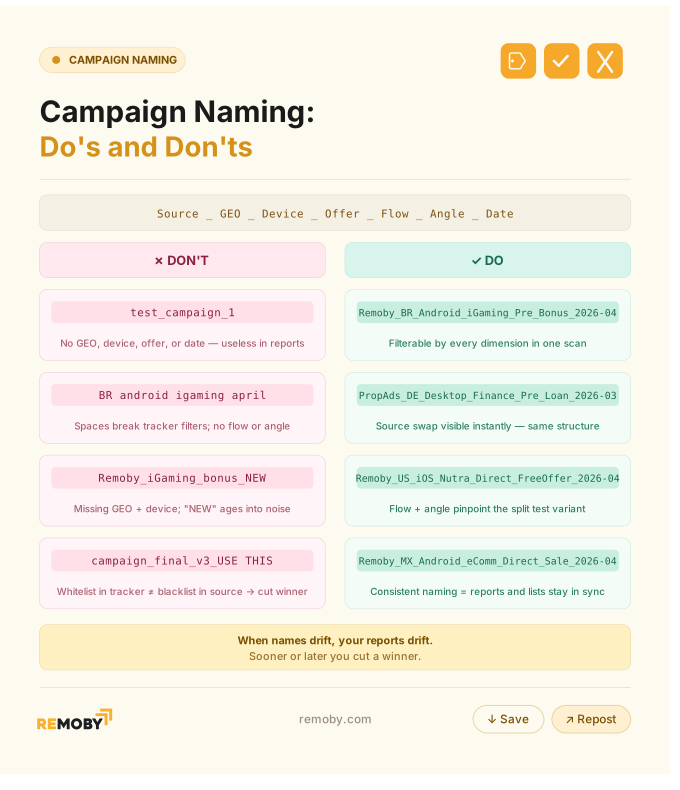
Use one format everywhere: Source_GEO_Device_Offer_Flow_Angle_Date. Example: PopAds_ID_Android_Giveaway_Prelander_CardSubmit_2026-04-29. When your tracker, source report, and blacklist sheet say the same thing, zone cuts are fast and mistakes are rarer.
Your test budget should match the payout logic, not your mood. A $4 CPA target with a $50 cap is a controlled test; a $100 payout with the same cap is often noise.
Exact setup order for a first pop ads campaign
Exact setup order for a first pop ads campaign is: confirm prerequisites, choose one conversion event, build tracker links, map source tokens, name the campaign, apply narrow settings, run QA clicks, verify attribution, then launch into a capped test. This order prevents the classic mistake where traffic starts before the data structure exists to judge it.
Step 1: Confirm prerequisites and pick the conversion event
The conversion event has to be the one you will actually optimize on. Lead with that decision, not with the ad network UI.
If the offer has registration, deposit, and retention events, pick the event tied to your payout or short-cycle KPI. Do not switch the goal on day one because the first number looks ugly.
Step 2: Build tracker flow and source-to-tracker token mapping
What breaks here is boring and expensive: one wrong macro, one missing external ID, one empty zone field. The funnel can still receive real traffic while your reports are unusable.
I have spent half a day blaming a bad zone when the real problem was a broken click ID. That budget never comes back.
Build the campaign URL in BeMob, Binom, or Voluum, then test every passed value in the click log before unpausing. No exceptions.
Step 3: Apply campaign naming and controlled-test settings
A first test should be narrow enough to diagnose. One GEO, one device type, one browser/OS cluster if needed, one offer flow.
Start around minimum bid plus 20% if volume is thin. Split desktop and mobile into separate campaigns, keep run-of-network unless you already have a blacklist, and apply a frequency cap around 1/24h, which aligns with common platform defaults and avoids noisy repeat exposure. General frequency capping best practices support setting limits early so the first read is cleaner.
For starting bid levels by GEO tier, check the pop traffic CPM benchmarks or Traffic Chart.
Step 4: Run QA clicks, verify attribution, then launch and review
50-100 test clicks at minimum bid is enough to catch most setup mistakes before real spend starts. If tokens fill, conversions attribute, and postback discrepancy stays under 5%, launch.
Review at hour 4 for flow problems, hour 12 for early zone cuts, and hour 24 for CPA direction. The harder call comes after that: whether bad CPA is from traffic, angle, or attribution lag.
Ready to launch with Remoby?
How do you set up tracking for pop ads so every zone is visible in reports?
Tracking setup for pop ads requires passing zone ID, click ID, campaign ID, GEO, and device fields from the source into the tracker, then returning the click ID through postback so conversions match the original click. Zone visibility exists only when the click log shows filled token fields and the tracker can group spend and conversions by zone. Without that, blacklist and whitelist work is guesswork.
Token mapping for zone ID, source, click ID, and other report fields
If all zones show the same CTR pattern or the same empty subIDs, your traffic is not “weird.” Your token setup is broken.
Map the fields before launch and spot-check raw logs, not only summary reports. Platforms like Remoby, PropellerAds, and Adsterra all support source identifiers, but the exact macro names vary by traffic source docs. One network worth testing for Tier-2 pop is Remoby (push and pop network with direct publisher relationships in Tier-2 and Tier-3 GEOs), but the rule stays the same across networks: no visible zone ID, no real optimization.
Postback URL setup and click ID capture
Most people assume clicks in the tracker mean postback is fine. They are unrelated until the conversion comes back with the same click ID.
Use `external_id` or your tracker’s equivalent as the return key. Fire one test conversion, then confirm the click record, conversion record, and source-side conversion count all point to the same event. For a step-by-step implementation, see how to set up a postback URL for pop campaigns. The blog gives a practical walkthrough of passing IDs and matching conversions.
Attribution QA: test clicks, empty token checks, and match-rate validation
Sub-5-second time-to-conversion is usually garbage data, not amazing traffic. Real pop users tend to convert in 30 seconds to several minutes.
Check three things before any zone cut: empty tokens under 5% of rows, tracker/network conversion match within 5%, and realistic click-to-conversion timing. If one fails, stop optimizing and fix setup first.
What settings matter most when setting up a pop ads campaign?
Campaign settings that matter most are GEO, device split, browser or OS filtering, source type, bid, daily cap, frequency cap, and schedule. The reason is practical: these settings decide traffic quality, spend pace, and whether the first data batch is clean enough to read. To make sure your bid is optimal, check live volumes and average CPM by GEO before fixing the GEO list.
Controlled-test settings: GEO, device, browser, OS, and source type
Start with one GEO and one device type. Mixed traffic hides patterns you need to see early.
If the offer historically converts on Android in Tier-2, do not open desktop, iOS, and extra GEOs because the dashboard feels empty. Cleaner segmentation gives clearer zone reports.
Bid, daily budget cap, frequency cap, and scheduling for a clean first test
A $50 daily cap on a $4 target CPA gives you room to learn without letting one bad zone torch the week. That exact setup showed 38 conversions by hour 24 in one Tier-2 Giveaway launch, with CPA falling from $5.20 to $3.65 by day 3 after zone cuts.
Keep scheduling open unless you already know dead hours. Bid for enough volume to test, not to dominate.
Direct link vs pre-lander for a first pop ads campaign
Direct link vs pre-lander comes down to diagnosis first, speed second. A pre-lander is the better default because it separates LP CTR from offer CVR, which tells you whether the angle failed or the offer failed. Direct link is better only when the offer is extremely simple or already built for cold pop traffic.
Comparison table: diagnostic clarity, conversion interpretation, and use cases
| Setup | Diagnostic clarity | Conversion reading | Best use case |
|---|---|---|---|
| Direct link | Low — no separation between creative and offer | Mixed signal — hard to tell what’s actually breaking conversion | Simple offers with a single action (e.g., single-field submit) |
| Pre-lander | High — clear separation: “creative → warm-up → offer” | Clean signal — you can measure CTR, LP CTR, and CR independently | Initial tests, iGaming, social, giveaway, any angle-driven campaigns |
| Verdict | Start with pre-lander for diagnostic clarity | Cleaner decision-making and faster optimization loops | Default choice unless funnel is extremely simple |
When to start with direct link and when a pre-lander is the better first test
The pattern I trust is simple: direct link wins rarely, and usually because the pre-lander was bad. In practice, pre-landers make failure readable.
I have only seen direct link beat a decent pre-lander a couple of times, and both cases were stupidly simple flows. Every other time, direct link hid the problem until the spend was gone.
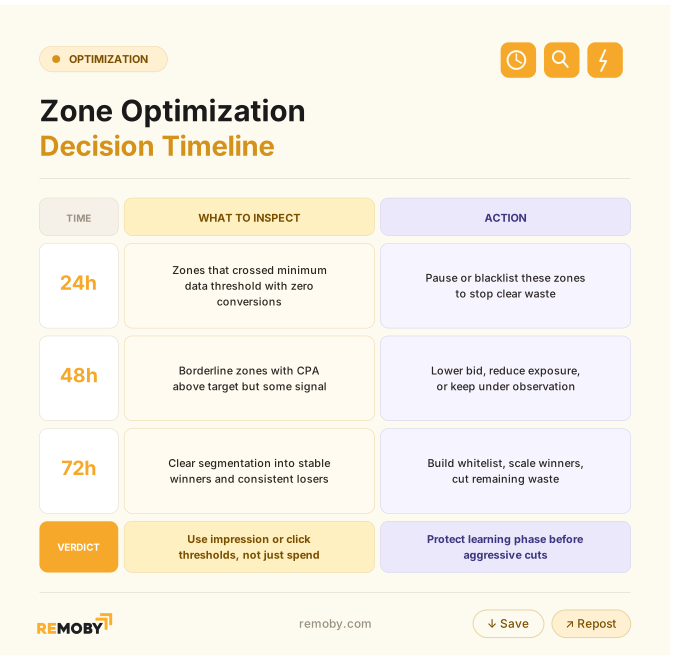
First 24 to 72 hours: when to pause zones, lower bids, or keep collecting data
First 24 to 72 hours decisions should follow data maturity, not panic. Pause zones only after they reach a fair impression threshold for the expected CVR, lower bids when traffic quality is borderline but visible, and keep collecting data when attribution is clean but sample size is still thin. Total campaign spend is less useful than per-zone impression volume.
What to check in the first few hours before making any optimization changes
Hour 1 matters more than hour 12 if the postback is broken. The first optimization is verification, not blacklisting.
Check postback match rate, zone visibility in the tracker, and time-to-conversion distribution. If any of those look wrong, leave bids alone and fix tracking.
Decision matrix for hours 24, 48, and 72
I grouped zone optimization timeline in a handy matrix, here it is.
What not to change too early in a first launch
Changing pop campaign targeting, bid, lander, and offer on day one turns one bad result into four unknowns. Then you learn nothing.
Keep the funnel stable long enough to get a real read. Budget increases should wait for stability; seven days is a safer line than one lucky day. Once the first read is in, switch to the post-launch optimization guide – fixed order: tracking, zones, bids, targeting.
Metrics to check after launching a pop ads campaign
Metrics to check first are postback match rate, zone-level impressions, token fill rate, time-from-click-to-conversion, CPA versus target, and spend pace against your cap. These metrics separate setup problems from performance problems. If attribution is broken, CPA analysis is fake; if attribution is clean, zone and timing patterns tell you whether the issue is traffic quality or offer fit.
Metrics table: postback match rate, zone-level impressions, CTR distribution, time-to-conversion, CPA, and spend pace
| Metric | Bad reading usually means | First action |
|---|---|---|
| Match rate | Broken or inconsistent postback flow | Fix tracking immediately before any optimization |
| Zone impressions | Missing tokens, bad mapping, or insufficient data volume | Verify token mapping and wait for minimum threshold if needed |
| CTR distribution | Uniform/flat CTR across zones = likely token/source ID issue | Audit traffic source parameters and IDs |
| Time-to-conversion | Unrealistically fast (<5 sec) = bot traffic or faulty event firing | Check postback logic, filter bots, validate event timing |
| CPA | Mismatch between traffic quality and offer economics | Compare against breakeven CPA and isolate source/zone impact |
| Spend pace | Bid too low/high or cap misconfiguration | Adjust bids, budgets, or pacing rules |
Fix data integrity first — optimization on broken data compounds losses
How to separate tracking problems from traffic or offer problems
If clicks are arriving and every zone looks equally bad, I look at tokens before I look at traffic. Flat patterns across all zones are usually a setup problem, not a universal traffic disaster.
If tracking is clean and LP CTR is weak, the angle or pre-lander is the issue. If LP CTR is fine but offer CVR is ugly, the offer path is the problem.
What is the best way to name a pop ads campaign so reporting stays organized?
Campaign naming works best when it mirrors how you actually optimize: source, GEO, device, offer, flow, angle, and date. A good name lets you compare tracker reports, source reports, and blacklist notes without translating anything. Organization is not cosmetic here; organized naming shortens the time between spotting a bad zone and acting on it.
Naming template: source, GEO, device, offer, flow, angle, and date
Use Source_GEO_Device_Offer_Flow_Angle_Date. Short enough to scan, detailed enough to filter.
Example: Remoby_BR_Android_iGaming_Prelander_Bonus_2026-04-29.
When names drift, your reports drift with them. Then the whitelist in your tracker does not match the blacklist in the source, and sooner or later you cut a winner. This is how consistent naming speeds up report comparison and zone actions
Common pop ads launch mistakes that waste budget
The ugly version is this: most launch losses are self-inflicted. Bad tracking, broad campaign targeting, early cuts, and wrong flow choice burn more money than the traffic source does.
Tracking and attribution mistakes
Clicks in the tracker do not prove the setup works. They prove the URL opened.
The common misses are empty zone tokens, broken click IDs, no postback QA, and optimizing while match rate is still off. If tracker shows 12 conversions and the source shows 18, stop there.
Optimization, and interpretation mistakes
Over-broad targeting feels efficient because volume comes fast. Fast volume is not the same as readable data.
Mixing GEOs, devices, and flows in one test hides signal. Cutting zones by total campaign spend instead of per-zone impressions is another classic mistake (we all have a campaign like that).
The campaigns that survive week one are rarely the ones with the hottest bid. They are the ones where hour one was honest: postback matched, zone data was visible, and the first cuts were made on real evidence instead of hope. For pop ads buyers, that is the whole point of a tracking-first launch.
Ready to launch with Remoby?
FAQ for launching a successful pop traffic campaign
Check out the FAQ not to miss with your next pop campaign
Test clicks should be 50-100 at minimum bid. That volume is usually enough to confirm the lander opens, tokens populate, click IDs pass, and a test conversion can be matched before real spend begins.
Click tracking and conversion tracking are separate paths. Missing conversions usually mean broken postback, bad click ID return, wrong conversion event, or attribution delay. Check those before blaming the offer. In pop ads troubleshooting, that is usually the first thing to verify.
Day-one changes should be limited to fixing broken setup or cutting zones that already hit a fair impression threshold with zero conversions. Changing multiple levers early makes the data unreadable.
Zone-cut data should be based on impressions against expected CVR. A practical rule is about 1.5x the inverse of expected CVR, which lands around 1,500-2,000 impressions for low-payout offers, 3,000-5,000 for $20-40 CPA Tier-2/3, and 8,000-10,000 for high-payout Tier-1.
![Pop Ads CPM in Indonesia [2026]](https://remoby.com/wp-content/uploads/2026/08/Screenshot-2026-08-03-at-16.38.38-768x431.png)
![Pop Ads CPM in Brazil [2026]](https://remoby.com/wp-content/uploads/2026/08/Screenshot-2026-08-03-at-15.12.01-768x431.png)